@arminunruh
Ok, thank you for your answer. :)
O
Olga V
@Olga V
Posts
-
Custom images as previos/next links -
Custom images as previos/next linksheyyy @Richard @arminunruh
is there a chance that my question could be answered soon?
a big thank you!
best
olga -
Custom images as previos/next linkshiiii!
is it possible to set custom images as previous/next links as it is possible in a text editor.
it is relevant for my mobile version. i created some arrows as buttons and would like to use them with this function but can't find the way.
https://olgaveer.de/re-natura-music-label/thank you!
best
olga -
Mobile dropdown menu change orderHi @Richard
Thanks for your help! I changed the menu hierarchy, so now the point „Impressum“ (menu 4 now) is the last one in the mobile screen how I wanted.
Best,
Olga -
Mobile dropdown menu change orderHi Richard, thanks for your answer. 👌
Well I just have this point „Impressum“ in the Third Menu. And somehow I can't change the order of the mobile dropdown manually.
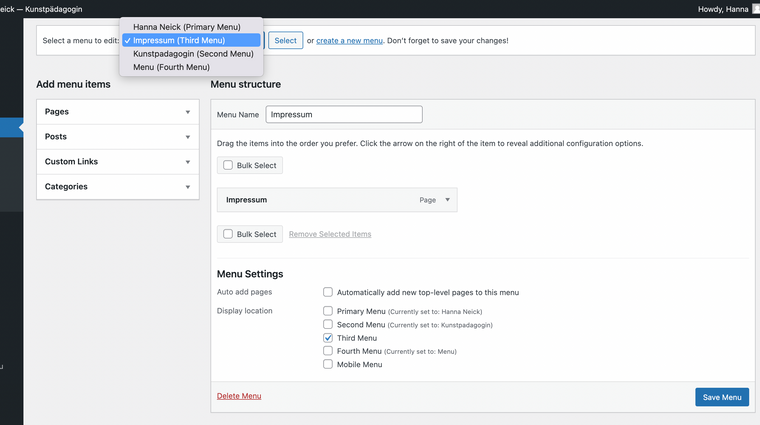
-
Mobile dropdown menu change orderHi guys,
site: hannaneick.de
i am trying to change the order of the menu in the mobile version. is there any possibility to do that? i would like to set the third menu (i have 4 in total on the site) as the last one in the dropdown mobile menu, so you would see impressum as the last point.
and also the anchor links are not working properly for me on the mobile version. it is not always jumping to the headline. do you know why?
would be very happy if you could help. thank youuuu! ♥
best
olga -
Text is not appearing properly@Richard Thank you! :)
-
Text is not appearing properlyHi Richard,
thanks. Oh yeah, weird, the problem is just gone. :D It was there for two weeks. A smile instead of „Trennstrich“. Maybe it just solved with an update. But cool, I am happy it's gone. Thank you! :)
Best,
Olga -
Text is not appearing properlyHi guys,
have a new problem on the site I am working on. the font breaking character is appearing as it would be a trial font, but it isn't. didn't have this problem some weeks ago with the same font. could you please help?
https://hannaneick.de
pw: zitronethank you!
olga -
Change position of close-icon mobile menuHi guys,
sorry, could you maybe help me with changing the position of the X-icon of the mobile menu? what's the class for it , I can't find it?
website: olgaveer.de
thanks a lot in advance,
olga -
Anchorschroll does not work properly@mariusjopen no news?
-
Anchorschroll does not work properlyHeyyy guys,
I’m working on a new webpage with a menu that is linked to anchors at the same page.
don’t get why it’s not working properly. Starting from the point: _Stop-Motion. Do you have any ideas?webpage: hannaneick.de
pw for viewing: Schwimmenthanks for helping!
Olga -
Active menu point according to project category@arminunruh
sent it to you! :) -
Active menu point according to project categoryhey @arminunruh
i tried it already a few times, unfortunately it doesn't work.
it is actually all the links beneath the pics have this problem.do you think we can solve it this week? wanna send the site to the artist to talk about it.
thanks.O.
-
Active menu point according to project categoryHi @arminunruh,
thanks for caring! I took a video.
Here the wetransfer-link:
https://we.tl/t-j9269SjXWDAs you can see in the first selection if I go to the project MEIAN STROKES the category
point DRAWINGS AND PAINTINGS is inactive and I can’t go to the next and previous project.As I selected the project through lightbox, the category point is active and can choose the next
or previous project.So the links beneath the images are not properly working,
Best.
O. -
Active menu point according to project categoryHi @mariusjopen,
it is working now if I’m choosing the project link in the lightbox view.
But unfortunately still not in the caption of the image itself.Could you please have a look what's the issue? Tried to delete the link and relink in the captions,
but it’s not changing.Thank you!
O. -
Customize Lightbox-plugin arrowsYeah, well I already tried that code:
#lightbox-region #lightbox-inner.cursor-left img {cursor: url("http://tihanavuk.com/wp-content/uploads/2020/01/cursor_left2.png") 9 9, pointer !important;
}#lightbox-region #lightbox-inner.cursor-right img {cursor: url("http://tihanavuk.com/wp-content/uploads/2020/01/cursor_right2.png") 9 9, pointer !important;
}I don't know why I didn't work. Is sth. wrong with it?
Thanks,
O. -
Active menu point according to project category@mariusjopen Safari & Firefox
-
Active menu point according to project categoryHeyy @mariusjopen,
one further question according to the projects and their category menu point.
I’m using two categories Drawings & Paintings and Projects.If I’m selecting one link at the front page to visit the project site the category menu point is inactive.
Neither the next/prev arrows work. Just if I'm reloading the project site the category menu point is active and
the navigation between the category projects works.How can I fix that?
Site infos:
tihanavuk.com
Pw:
MexikoThanks so much for your support!
O. -
Customize Lightbox-plugin arrowsHi @mariusjopen,
sorry, I really CAN'T find the setting option!
I can see it in the carousel addon though, but not in lightbox.Here’s a screenshot from my interface.
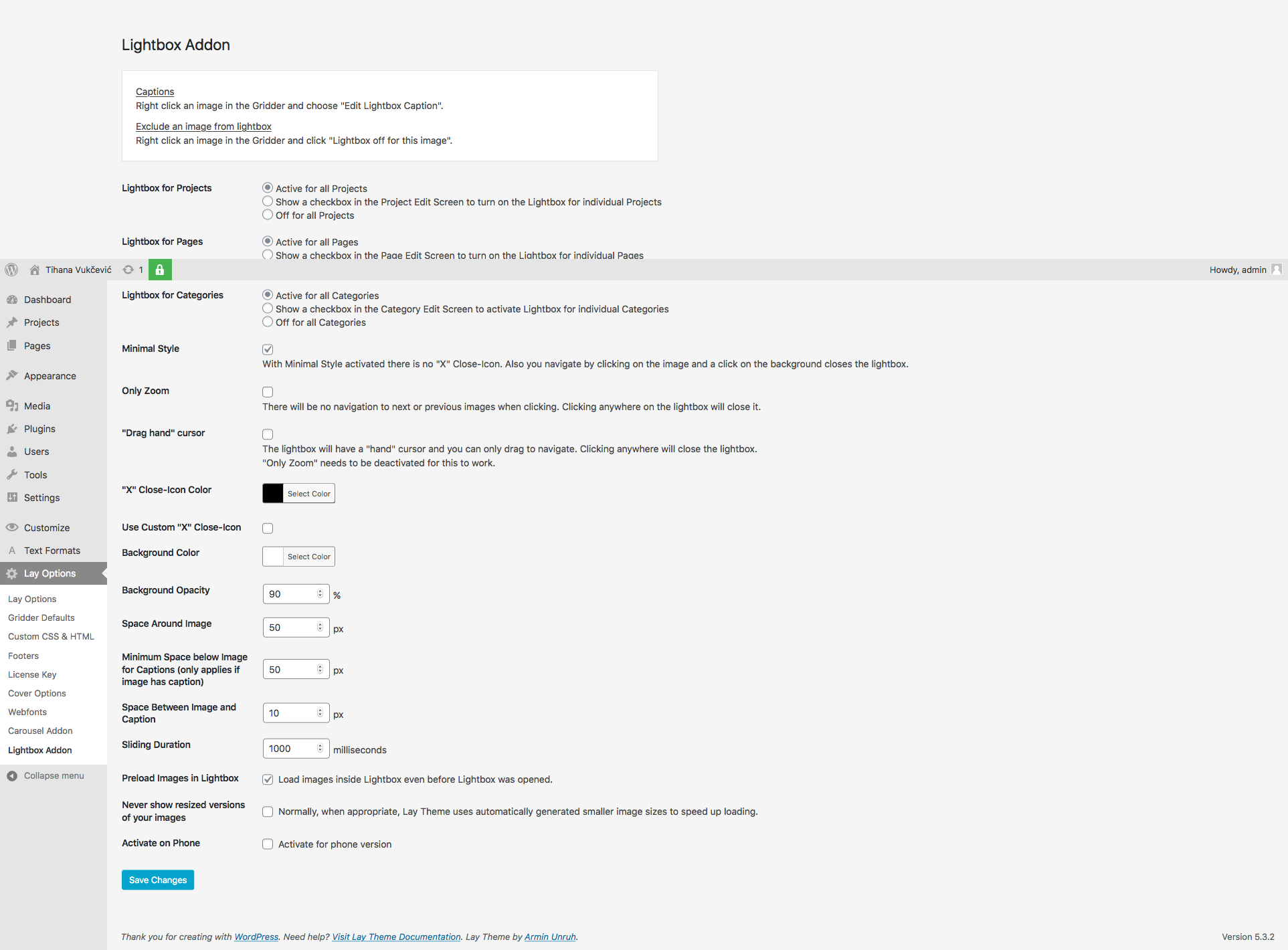
Best,
O.