I had the same problem and found the option is now in "Inner Space" in the sidebar
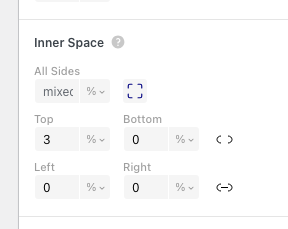
I had the same problem and found the option is now in "Inner Space" in the sidebar
@Richard Hey Richard, just wondering if you got my email?! Thanks!
Hey Richard, not sure the chat is working, do you have an email I can send stuff to? Thanks!
Awesome, looks perfect. Thanks for the help!
Hey Richard,
thanks for the reply!
The JS still runs on my mobile too! Do you have an email I can send code / links to? Just because it's something I'm in the middle of working on for someone.
Thanks!
Hello there,
I'm adding some additional Javascript to a page on my site, using the dropdown in the editor:

The code runs something that is only really worthwhile on desktop, and works fine, but I don't want it to run on mobile. So, I created the custom mobile layout, clicking on the phone icon and choosing "start with empty layout" and created a new design, but the code still runs there on mobile.
Is there a way to add code this way and have it only work on the desktop version of the same page?
Thanks!!
Hello there,
I would like to add a custom class to the main navigation items, and the site title, I'm playing around with hover effects from:
https://ianlunn.co.uk/articles/hover-css-tutorial-introduction
so would simply like to add, for example, the class ".hvr-buzz" to them to make them "buzz" on hover
Is there a way to do this? I know it's possible when creating a page / project by right clicking on the element, but was wondering how to go about doing it with main navigation.
I thought it would be better to simply add the .hvr-buss class, than to add all of the css for the buzz to eg ".menu-item, .sitetitle-txt-inner"
Thank you!!