Skip to content
  • Recent
  • Tags
  • Popular
  • Users
  • Search
Skins
  • Light
  • Brite
  • Cerulean
  • Cosmo
  • Flatly
  • Journal
  • Litera
  • Lumen
  • Lux
  • Materia
  • Minty
  • Morph
  • Pulse
  • Sandstone
  • Simplex
  • Sketchy
  • Spacelab
  • United
  • Yeti
  • Zephyr
  • Dark
  • Cyborg
  • Darkly
  • Quartz
  • Slate
  • Solar
  • Superhero
  • Vapor

  • Default (No Skin)
  • No Skin
Collapse

Lay Theme Forum

S

spontans

@spontans
Unfollow Follow
About
Posts
147
Topics
62
Shares
0
Groups
0
Followers
0
Following
0

Posts

Recent Best Controversial

  • New custom element! + problem
    S spontans
    Ai Mode

    I've created a new custom element! A gallery that toggles between a carousel and a thumbnail grid. very 2006 but i like it :)

    https://learnwithsasha.com/private/nardeen/hey/

    The problem I found is that in the back office, in the gallery, when I click " Add item : to add more images, it deletes all the previous ones.

    That what Claude said:

    "Confirmed and reproduced: the third image replaced both previous ones entirely. This is a bug in Lay Theme's own native gallery picker UI — not something in my element's code, and "Never modify Lay Theme itself" means I can't patch it directly. I'll report it clearly and give you a working alternative. Now building the rest of the changes."
  • Some feedback on views
    S spontans
    Ai Mode

    Hoorayyyy :))
    Please share the result when you finish!


  • Some feedback on views
    S spontans
    Ai Mode

    https://learnwithsasha.com/private/nardeen

    Hi Armin, I've created a custom post type for works with custom view (no gridder).

    Made some notes from my experience:

    1. Would be nice to have lightbox enabled for images / add in lighbox settings option to enable it for custom post type

    2. It seems that image loading mechanism is different in AI generated view.
      While gridder images load softly, the custom view loads them roughly... it would be nice that it inherits the same lazyload mechanism.

    3. I asked Ai to generate a footer with navigation buttons between works.
      It works nicely but it doesnt load pages softly with AJAX and creates a jump.

    4. Maybe in the Ai -> custom views settings, you could add frame settings like in gridder.

    5. When I asked to add a google font as a webfont, it downloaded the actual file instead of adding a script. This didn't allow the

    And hey... besides that, it worked!! first client website with Ai modeeeee


  • Gridder render error: Minified React error #185
    S spontans
    General Discussion

    ah, i tried it in chrome incognito w and safari and the error didn't appear there.
    maybe it's a session related bug then


  • Gridder render error: Minified React error #185
    S spontans
    General Discussion

    https://learnwithsasha.com/private/nardeen
    macbook pro 16
    laytheme version: Current version: 7.1.1 (problem also occured in the last previous version)

    Hi,
    Each time when I try touching an element on the gridder it crashes with the following error:

    "Gridder render error: Minified React error #185; visit https://reactjs.org/docs/error-decoder.html?invariant=185 for the full message or use the non-minified dev environment for full errors and additional helpful warnings."

    I've tried to disable custom html/css and the AI mode.
    Thanks in advance,
    Sasha


  • Bug in LayTheme 11.5.1 – Right-click in Gridder causes React render error
    S spontans
    Bug Reports

    @chris.vuko Thanks Chris, I will try now


  • Bug in LayTheme 11.5.1 – Right-click in Gridder causes React render error
    S spontans
    Bug Reports

    same here.


  • searching for costum design
    S spontans
    Connect and find Help

    hi, if you still need help please feel free to reach out
    spantan@gmail.com

    here is my portfolio: cleanplatestudios.com


  • CustOM order for project index
    S spontans
    Bug Reports

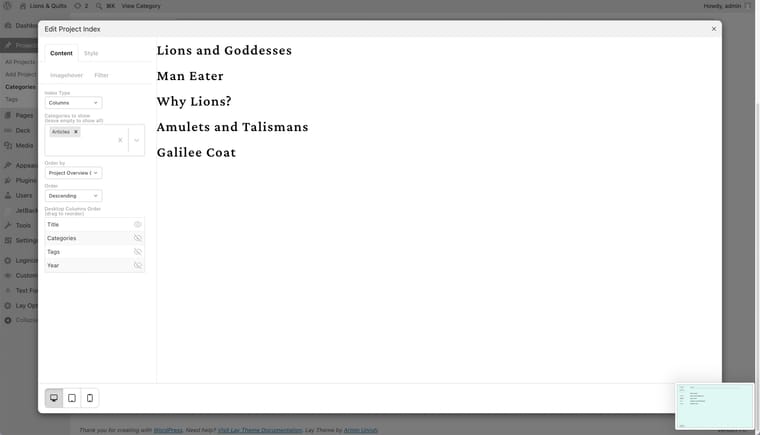
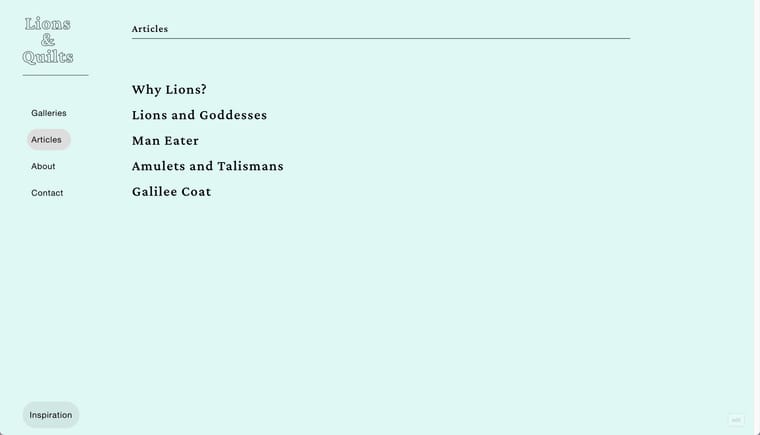
    Hi Armin,
    I'm also struggling with ordering the project index module.
    Dor order by "Project Overview" relate to the order appears in the draggable project list under the overall Projects tab?

    Also, the order that appears in the admin doesn't always corralate with what I see on the actual website... attaching some screenshot. Cache is disabled.

    The page address:
    https://lionsandquilts.com/category/articles/

    Screenshot-2026-05-31-at-1.03.08-PM.jpg Screenshot-2026-05-31-at-1.03.03-PM.jpg


  • would be cool to enable "set hover image or video" in text's links inside inside the element grid
    S spontans
    Feedback

    Yeah 👏! That works now.
    And thank you for the inspiring examples with the Project Index tool.


  • would be cool to enable "set hover image or video" in text's links inside inside the element grid
    S spontans
    Feedback

    I have a student who is trying to create a text-first project index,
    means that each item of the grid is actually a line\multiple lines of text, and that on hover, she desires an image to appear behind it.

    I figured out that the easiest way to realize it will be using the Elements Grid, but unfortunately, the text objects there don't allow the image hover function in links!

    Maybe it would be nice to consider adding this in the future update.

    AND \ OR 🥁🥁🥁

    Allowing an option for the thumbnail grid to initially display projects with hidden thumbnails, which will appear only on mouseover.

    Sorry if it's not very clear, I'm having a little hangover.

    Thanks,
    Sasha


  • Thumbnail Image aspect Ratio
    S spontans
    Feedback

    Thanks Armin,
    Worked like a charm, would be very useful if there would a way in the future to control it via the Thumb\Element grid visual interface...

    I've also implemented it for Element Grid:

    .elements-collection-region .ph{
    padding-bottom: 100%!important;
    }

    .elements-collection-region .element-wrap img,
    .elements-collection-region .element-wrap video{
    width: 100% !important;
    height: 100% !important;
    object-fit: cover !important;
    object-position: center !important;
    }


  • Thumbnail Image aspect Ratio
    S spontans
    Feedback

    would be very helpful and freeing of cropping the images manually


  • enable\disable project overlay for certain project categories
    S spontans
    Feedback

    Hey Armin,

    I love the project overlay feature, but I sometimes want to use it only for a certain category and let the other project behave normally. It could be nice to have control over that.

    Another request regarding the overlays is to add an option to hide the menu when the overall opens (The "x"/Close button often overlaps with the menu and actually reduces its need).

    Thanks


  • Feature request: place freely but not freely on phone
    S spontans
    General Discussion

    Hi Armin,

    I like the "place freely" option for desktop, but I hate creating a mobile layout for mobile if I just want all the elements to be stacked in one row. Maybe it would be nice if there were an option to translate the freely placed layout to mobile or just stack everything.

    Thanks


  • fixed footer
    S spontans
    Feedback

    Thank you!


  • active state for index (clarity inside)
    S spontans
    Feedback

    Thanks Armin,
    I never thought of working in that way!
    That makes a lot of sense.. merci


  • fixed footer
    S spontans
    Feedback

    Hi, It would be nice to have the option to make the footer "fixed".
    It might be very useful, especially for those who have a vertical navigation menu on their sites, so the footer can stay fixed at the bottom of the menu side (which is usually a blank space anyways).

    Cheers


  • active state for index (clarity inside)
    S spontans
    Feedback

    Hi Armin,

    Wanna share with you one thing that my student has pointed out.
    Let's say "Works" is my project index page which shows the projects as a thumbnail grid/list or whatever..
    When I click on one of the projects, it would be nice if the "Work" menu item's current state would still be active, to give the viewer more orientation.

    There also can be a tricky situation here...
    What if one has several project index pages? 'Works' and 'Exhibition' let's say...
    Each index shows only one project category.
    I've succeeded in fixing the problem with CSS, but I think that it's quite a basic need, and would be great to see such a feature in upcoming updates!

    Maybe somehow a page can have an option to be assigned as an 'Index' page for a certain project category...


  • turn off overlay in mobile view
    S spontans
    General Discussion

    I like your brainstorming monologue in the previous reply (:

    Thanks for this solution, it is exactly what I needed!

  • Login

  • Don't have an account? Register

  • Login or register to search.
  • First post
    Last post
0
  • Recent
  • Tags
  • Popular
  • Users
  • Search