Thanks so much Armin!
S
sreibel
@sreibel
Posts
-
order of project items is getting mixed up -
Updating Projects or pages bug when using tablesDear Armin,
I noticed a bug in the newest Lay Version. When changing content in a table the button to "update" / "Aktualisieren" to push the changes live does become unclickable. Both in Chrome a Safari, and on all projects or pages. Any other changes in image or text does not cause any problem. Just change in any table will cause this error.
Is this something you are able to look into?
Thank you!
-
order of project items is getting mixed upHi,
when using "Sort by Date" in the Project Thumbnail Grid block, the sort order is hardcoded to DESC, meaning the post with the farthest future date appears first. For event-based sites, the expected behavior is the opposite: the nearest upcoming date should appear first, in ascending order.
The fix is a one-line change in frontend/assets/php/elements/thumbnailgrid_functions.php at the two places where $order is set:
Current:
if( $orderby == 'menu_order' || $orderby == 'post_title' ) {
$order = 'ASC';
}Suggested fix:
if( $orderby == 'menu_order' || $orderby == 'post_title' || $orderby == 'post_date' ) {
$order = 'ASC';
}Ideally this could also be a configurable option in the block editor, for example "Sort by Date ascending" vs. "Sort by Date descending", similar to the existing "Reverse Order" button.
Thank you!
-
Make project thumbnails unclickable or even use custom link.Works, thanks again
-
Make project thumbnails unclickable or even use custom link.Hey Armin, thanks for the super swift response! The links work once "always show mouseover state" is selected, but unfortunately we can't use that option as the whole website is built on thumbnails with alternative images (and thus mobile would look completely different then). But thanks a bunch already for taking care of this issue in the next update, very much appreciated!
-
Make project thumbnails unclickable or even use custom link.Hey @arminunruh dear @mariusjopen , thanks for much for this update, was super helpful on the site we are currently building! Unfortunately, on mobile, custom links that link to a page outside of the current website do not work. Any idea why? All other internal links do, and all external links work on desktop just fine.
Please have a look at this section https://224.shortnotice.online/besuch/ all the way down.
-
Bug in Element Grid—affecting multiple websitesHey Armin,
thanks so much for getting back to me about that.
Worked out just fine! Thanks! -
Bug in Element Grid—affecting multiple websitesHi!
First of all, thanks so much for putting in so much effort and upkeep for Lay theme.
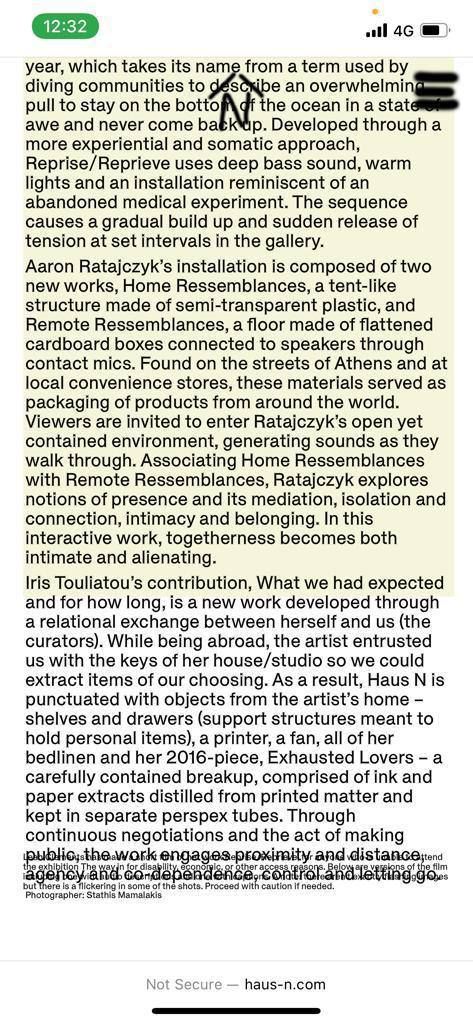
I have an issue with the Element grid, where elements are showing up with a random overlap, and/or elements being cut off at the bottom—only on mobile. Once refreshing the page, the bug is gone. As this bug is affecting a number of our clients websites suddenly, I would really appreciate if you could have a look at this.
Website examples where the bug appears:
A: [https://haus-n.com/jupiter-in-pisces]
B: [https://www.palliativeturn.org/category/contact/]
(As its quite random/unpredicatable where the bug appears, I attached some images what happens as well)
A:
B: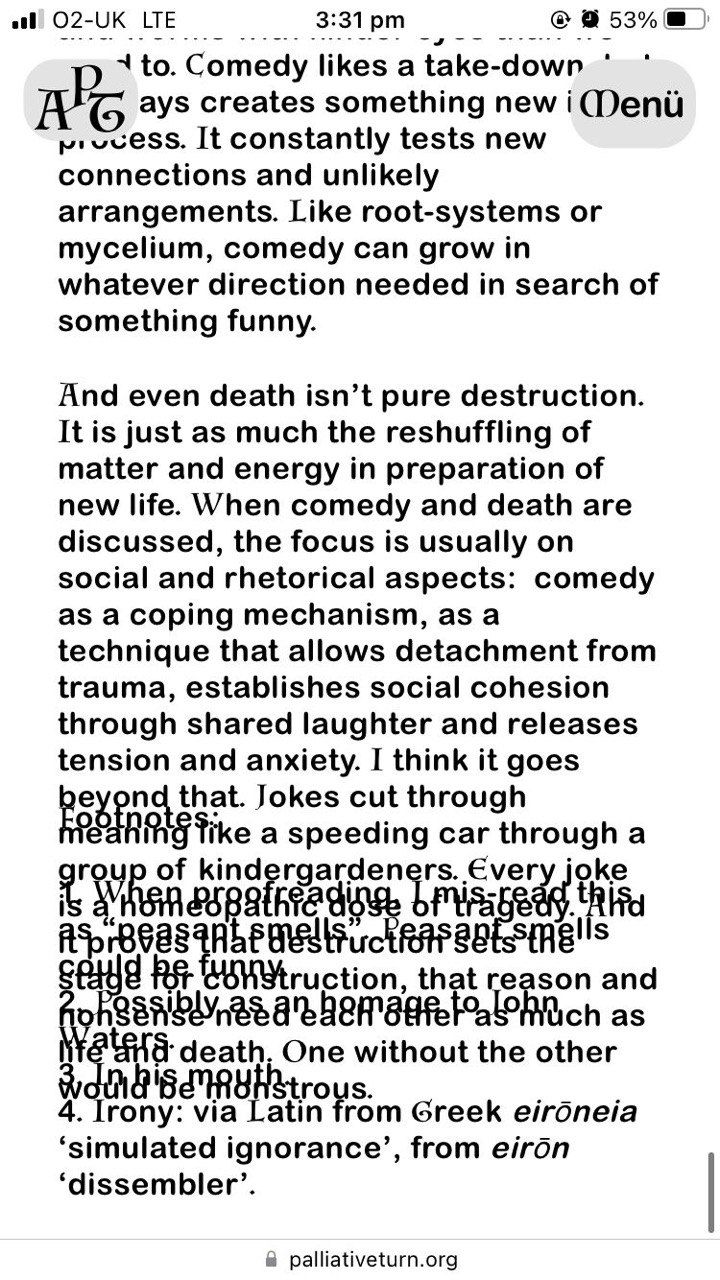
Thanks a lot for taking a look at this!
-
Image Hover Add-on Link Modal doesn't show upHey there,
working on a website rn, (shellcompany.co.uk) and installed and activated the image hover plugin. All the options are visible in the settings menu, but when I try to add a hover image in the link modal, this image hover option doesn't show up at all.
Any ideas why that is so?
Kind Refards