thanks ❤️
 W
W
Walker
@Walker
Posts
-
text editor not working -
text editor not workingsame problem has been postet years ago here:
http://laythemeforum.com/topic/6962/text-editor-not-working?_=1732101196429 -
text editor not workingthanks for the answer, I sent you all infos
-
text editor not workingI have some issues with the Text editor showing up false after I have set up my laytheme website.
I already tried deactivating all third party plugins.
Also I tried editing the wp-config.php like described here:Make sure in "User" → [Your User] → "Disable the visual editor when writing" is not checked.
Also make sure you add "define('CONCATENATE_SCRIPTS', false );" to your wp-config.php.Any Ideas what could be wrong?
Best, Walker!
-
Integrate mapbox mapThanks a lot for you time!
Now it works. 😘
-
Integrate mapbox mapHi @arminunruh,
thanks for the answer.I changed the code, but didn't work.
I have the feeling the problem is the div which I insert into the certain page. Here is a picture how I did it.
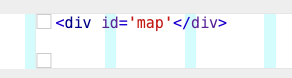
The interesting part is, when I put all the code I posted above into the custom head area (also the "div id=map ...") then the map appears. But on every page and always ...
-
Integrate mapbox mapHi there,
I want to integrate a mapbox map into a page.I have tried a lot but I can't get it done.
Here is the way I tried to do it.
(here is also a simple instruction from mapbox: https://www.mapbox.com/install/javascript/cdn-install/)In the custom head area I copied this:
<script src='https://api.mapbox.com/mapbox-gl-js/v2.9.1/mapbox-gl.js'></script>
<link href='https://api.mapbox.com/mapbox-gl-js/v2.9.1/mapbox-gl.css' rel='stylesheet' />

<script>
  mapboxgl.accessToken = 'YOUR_MAPBOX_ACCESS_TOKEN';
  var map = new mapboxgl.Map({
    container: 'map',
    style: 'mapbox://styles/mapbox/streets-v11'
  });
</script>
In the specific page where the map should show up, I inserted a html with the following:
<div id='map' style='width: 400px; height: 300px;'></div>Thats it, but nothing will appear on the site.
––––
When I insert the Div into the custom head area it works, but then the map is globaly on every page.I think this should be not too complicated.
If anybody can help I would be very happy.Thanks
-
gumroad embeded script is not loadingHey Richard, thanks for your answer.
The "Disable Ajax" did not work for this problem.But I found a workaround for me, instead of the site title I placed a second menu with the same name ...
problem had something to do with the frontpage ... ?!
Thank
-
gumroad embeded script is not loadingHi Richard,
I think the problem is that Lay Theme website is a "Single Page" JavaScript application and cannot just use jQuery(document).ready(…) to execute the js because the ready event only fires once when the website loads the first time.
I tried to solv it with the following instructions;
https://laytheme.com/documentation.html#custom-javascriptbut my js knowlegne is limited ...
<script>
window.laytheme.on("newpageshown", function(layoutObj, type, obj){
if(type == "page" && obj.id == 2){
src="https://gumroad.com/js/gumroad-embed.js";
}
});
</script> -
gumroad embeded script is not loadingHi there,
I just integrated the script from gumroad for a product. It`s a test site.
https://www.computerbeachparty.shop/cbp2020The Script is on the Front Page.
When I click on the About Site and afterwards back again on the Site Title the Front page is loading but not the product. I think the gumroad script needs a reload to show again the product.I could not find a solution!?
Anyone an idea?
thanks a lot
Simon
-
Here's mine -
Here's mineHallo Hayo,
your website is very nice!
I would like to ask you one question.
After viewing a project, I would like to come back to the homepage previous scrolled position when I press my browser back button (history.back()).
You managed to do this on your website.
Would it be possible telling me how you did this?
That would be very kind of you!Thanks
Walker -
Project Page shows no contentProblem solved.
After updating all my plugins...?? -
Magnetic SlidesSince the last update, my Magnetic Slides Addon does not work anymore.
Can anyone help me?
rothsimon.deThanks
-
Project Page shows no contentHi,
since the last update my Project Content is empty, blank page.
My site is: www.rothsimon.deDoes anyone has a solution for this?
-
Unable to edit caption for Carousel Addon -
Edit CarouselHi,
is there a way to insert html into a carousel slide?
In the "Edit Carousel" window there are several possibilities for inserting content.Through the Insert Text Field I tried to insert html code. - A picture with Text on it.
This did not funktion.
Is there a was to insert html in this Text Field?
Thanks
Walker
-
Grafik Design Website