Skip to content
  • Recent
  • Tags
  • Popular
  • Users
  • Search
Skins
  • Light
  • Brite
  • Cerulean
  • Cosmo
  • Flatly
  • Journal
  • Litera
  • Lumen
  • Lux
  • Materia
  • Minty
  • Morph
  • Pulse
  • Sandstone
  • Simplex
  • Sketchy
  • Spacelab
  • United
  • Yeti
  • Zephyr
  • Dark
  • Cyborg
  • Darkly
  • Quartz
  • Slate
  • Solar
  • Superhero
  • Vapor

  • Default (No Skin)
  • No Skin
Collapse

Lay Theme Forum

  1. Home
  2. General Discussion
  3. JS History Back link

JS History Back link

Scheduled Pinned Locked Moved General Discussion
10 Posts 4 Posters 1.9k Views
  • Oldest to Newest
  • Newest to Oldest
  • Most Votes
Reply
  • Reply as topic
Log in to reply
This topic has been deleted. Only users with topic management privileges can see it.
  • D
    D
    DLB
    wrote on last edited by
    #1

    Hi there,

    I‘m trying to create a binding JavaScript History Back link on a page.

    This is the code I’m using in the custom HTML head section, but it doesn't seem to work…

    <script>
    jQuery(document).on("click", "go-back", function(event) {
    history.back();
    });
    </script>
    

    I’ve set a custom HTML class to the text box – "go-back"

    But I can't seem to get it to work. I want it to work like a ‘normal’ HTML link, so when hovering the cursor over the text link, it will change to a ‘hand’ as standard, and when clicked goes back to the previous page.

    Does anyone have any thoughts about this?

    Thanks, D

    1 Reply Last reply
    0
    • mariusjopenM
      mariusjopenM
      mariusjopen
      Global Moderator
      wrote on last edited by
      #2

      Dear @Des

      did you try this?

      jQuery(document).on("click", ".go-back", function(event) {
      history.back();
      });
      </script>
      

      Best!

      Marius

      www.mariusjopen.world

      1 Reply Last reply
      0
      • D
        D
        DLB
        wrote on last edited by
        #3

        Hi @mariusjopen

        Yes, I've used that code, and have now got it work. However, for the link, when hovering over it, the cursor does not change to a ‘hand’ to indicate it's a link, so it‘s not obvious to the viewer of the site.

        I have tried putting a href link in the JS custom code, but can't get it to work.

        <a href="javascript:history.back()"> Close </a>

        Any tips?

        Thanks

        1 Reply Last reply
        0
        • mariusjopenM
          mariusjopenM
          mariusjopen
          Global Moderator
          wrote on last edited by
          #4

          Dear @Des
          with CSS you could make cursor: pointer
          Easy
          Best!
          Marius

          www.mariusjopen.world

          1 Reply Last reply
          0
          • D
            D
            DLB
            wrote on last edited by
            #5

            @mariusjopen ah yes, of course – I should have thought of that, thanks.

            1 Reply Last reply
            0
            • mariusjopenM
              mariusjopenM
              mariusjopen
              Global Moderator
              wrote on last edited by
              #6

              No worries! Happy to help!

              www.mariusjopen.world

              1 Reply Last reply
              0
              • S
                S
                sebht
                wrote on last edited by
                #7

                Hey guys, I've been trying to follow but it seems like I'm missing out on something here. Would you care to explain for dummies again?

                I have a png which I want to assign the class to in order to make it a button with history.back function.

                This is the part I insert in Custom <head> content

                <script>
                jQuery(document).on("click", "go-back", function(event) {
                history.back();
                });
                </script>
                

                What to I insert elsewhere to make it an applicable class, which turns my png into a clickable link?

                Many thanks!

                1 Reply Last reply
                0
                • RichardR
                  RichardR
                  Richard
                  Global Moderator
                  wrote on last edited by
                  #8

                  Dear @sebht

                  Lets see if we can find a solution :)
                  A Png that you have inserted where exactly in your website?
                  (in a project or have you inserted it in CUSTOM HTML perhaps)

                  Just to have a better idea?

                  The <Script> is looking to call "go-back" so we need to set up the PNG with this call -

                  Maybe this is what you are after?
                  Would be good to have more understanding

                  Let me know :)

                  best wishes
                  Richard

                  1 Reply Last reply
                  0
                  • S
                    S
                    sebht
                    wrote on last edited by
                    #9

                    Dear @Richard-Keith

                    thanks for getting back! Here's the link to the project page I'm working on. The png is the red X in the top right corner. This project shows in the categories 'home' and 'edit', which is why I need the back function.

                    So I've gotten the <Script> to work by assigning the png a class – figured it out by myself :)

                    However, I have to click it twice to go back to the previous page. I guess there's an event in between that the button goes back to. How do I edit the <Script> to go to the overview?

                    Best,
                    Seb

                    1 Reply Last reply
                    0
                    • RichardR
                      RichardR
                      Richard
                      Global Moderator
                      wrote on last edited by Richard
                      #10

                      Dear @sebht

                      Cool Website! :)

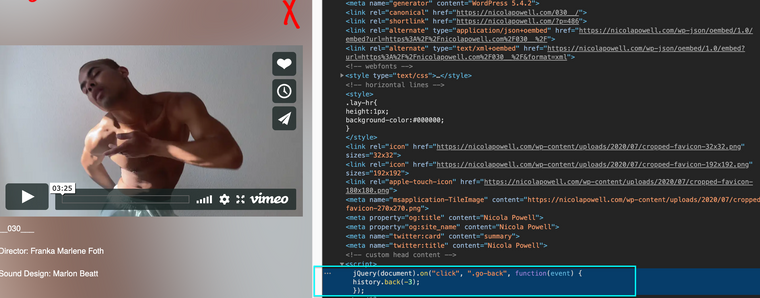
                      The Click function doesn't work for me.

                      Screen Shot 2020-08-12 at 5.44.59 PM.png

                      But i see your <Script> did you take the class away from the PNG X?

                      Screen Shot 2020-08-12 at 5.47.02 PM.png

                      Best
                      Richard

                      1 Reply Last reply
                      0

                      Hello! It looks like you're interested in this conversation, but you don't have an account yet.

                      Getting fed up of having to scroll through the same posts each visit? When you register for an account, you'll always come back to exactly where you were before, and choose to be notified of new replies (either via email, or push notification). You'll also be able to save bookmarks and upvote posts to show your appreciation to other community members.

                      With your input, this post could be even better 💗

                      Register Login
                      Reply
                      • Reply as topic
                      Log in to reply
                      • Oldest to Newest
                      • Newest to Oldest
                      • Most Votes


                      Online Users
                      Forgot your key, lost your files, need a previous Lay Theme or Addon version? Go to www.laykeymanager.com
                      laytheme.com
                      • Login

                      • Don't have an account? Register

                      • Login or register to search.
                      • First post
                        Last post
                      0
                      • Recent
                      • Tags
                      • Popular
                      • Users
                      • Search