Text on top of an image
-
Hi all,
I saw an old post about wanting to place text on top of an image. I would prefer to not 'paste' it in to the image, but have it on top of the image. I saw you mentioned this wasn't possible, however I'm wondering if this is now possible with the most updated version?
Many thanks, and I love your theme! :)
-
Hi again,
Okay I worked out I can achieve what I want to do by adding my bio to the site tagline box in the customizer. The only thing is I can't add padding to each side of the text (in the screengrab I've just added turnarounds for now). I'm not a coder so am wondering what the code would be to add padding to the tagline and where I would place it?
Many thanks! :)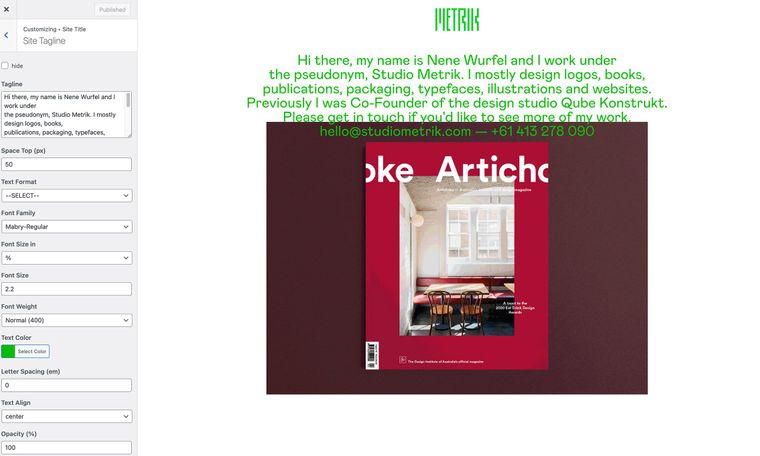
-
Dear @willowj
The Tagline region can be targeted with the following code:
.tagline {
// insert desired CSS here
}
And you can add padding in two different ways, the short hand way:
padding: 0px 20px 0px 20px;This works on a compass, so North, east, south, west - (or top, right, bottom, left)
north 0px, east 20px, south 0px, west 20px
And long-hand or individual paddings:
Padding-left:20px;
Padding-right: 20px;
Details here:
For example:
.tagline {
padding-bottom:20px;
padding-left:20px;
}
Custom CSS can be added via:
Lay Options > Custom CSS & HTML > Custom CSS
Have a wonderful day @willowj 🌻
Richard

Hello! It looks like you're interested in this conversation, but you don't have an account yet.
Getting fed up of having to scroll through the same posts each visit? When you register for an account, you'll always come back to exactly where you were before, and choose to be notified of new replies (either via email, or push notification). You'll also be able to save bookmarks and upvote posts to show your appreciation to other community members.
With your input, this post could be even better 💗
Register Login