Skip to content
  • Recent
  • Tags
  • Popular
  • Users
  • Search
Skins
  • Light
  • Brite
  • Cerulean
  • Cosmo
  • Flatly
  • Journal
  • Litera
  • Lumen
  • Lux
  • Materia
  • Minty
  • Morph
  • Pulse
  • Sandstone
  • Simplex
  • Sketchy
  • Spacelab
  • United
  • Yeti
  • Zephyr
  • Dark
  • Cyborg
  • Darkly
  • Quartz
  • Slate
  • Solar
  • Superhero
  • Vapor

  • Default (No Skin)
  • No Skin
Collapse

Lay Theme Forum

  1. Home
  2. General Discussion
  3. Font-size problem on mobile

Font-size problem on mobile

Scheduled Pinned Locked Moved General Discussion
16 Posts 4 Posters 4.9k Views 2 Watching
  • Oldest to Newest
  • Newest to Oldest
  • Most Votes
Reply
  • Reply as topic
Log in to reply
This topic has been deleted. Only users with topic management privileges can see it.
  • L
    L
    Loris
    wrote on last edited by
    #3

    Hi @mariusjopen,
    Ok! I have sent an email yesterday.
    All best!
    Loris

    1 Reply Last reply
    0
    • mariusjopenM
      mariusjopenM
      mariusjopen
      Global Moderator
      wrote on last edited by
      #4

      Hi Loris,

      I think I solved it.

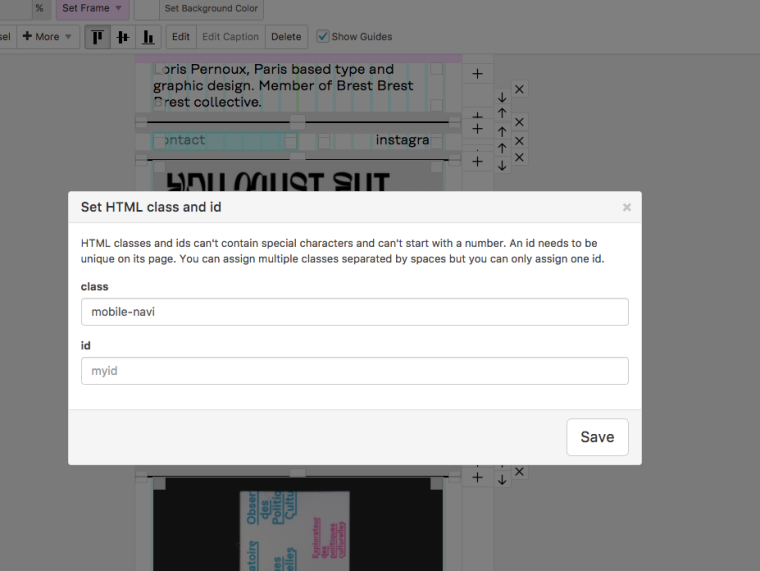
      I gave the two mobile navi elements a special div class:
      0_1508315989929_Bildschirmfoto 2017-10-18 um 10.39.04.png

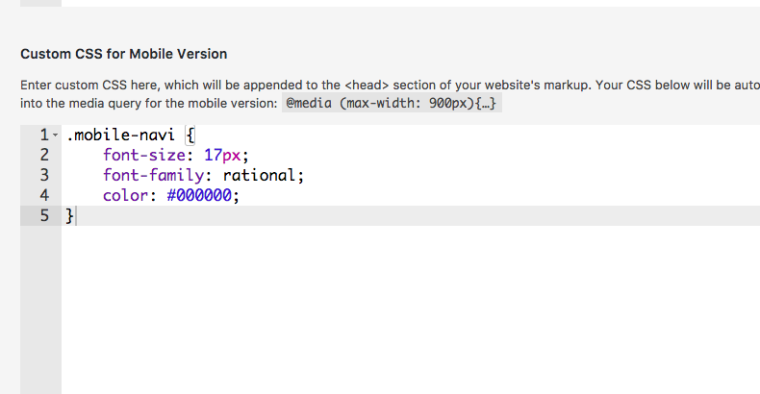
      And then added a mobile navi CSS with the font size:
      0_1508316009536_Bildschirmfoto 2017-10-18 um 10.39.10.png

      I hope that works for you!

      Best!

      Marius

      www.mariusjopen.world

      1 Reply Last reply
      0
      • L
        L
        Loris
        wrote on last edited by
        #5

        Hi @mariusjopen
        Thank you! But I think there is still something wrong in there… it doesn't seem to work (see image). "contact" and "instagram" stay smaller than the rest when it is switch to landscape… It should be all the same.
        All best,
        Loris

        alt text

        1 Reply Last reply
        0
        • mariusjopenM
          mariusjopenM
          mariusjopen
          Global Moderator
          wrote on last edited by
          #6

          HI @Loris
          ok, this is rather odd.

          I will double check with Armin what isa going on here.

          Best!

          Marius

          www.mariusjopen.world

          1 Reply Last reply
          0
          • L
            L
            Loris
            wrote on last edited by
            #7

            Hi @mariusjopen
            Do you have any news on my issue?
            I hope it is solveable.
            All best,
            Loris

            1 Reply Last reply
            0
            • mariusjopenM
              mariusjopenM
              mariusjopen
              Global Moderator
              wrote on last edited by
              #8

              Hi @Loris

              I will let you know asap!

              Best!

              Marius

              www.mariusjopen.world

              1 Reply Last reply
              0
              • D
                D
                Davide
                wrote on last edited by
                #9

                I'm having the same problem on mine.
                It would be great to fix this!

                1 Reply Last reply
                0
                • mariusjopenM
                  mariusjopenM
                  mariusjopen
                  Global Moderator
                  wrote on last edited by
                  #10

                  Hi @Davide
                  we are on it.

                  Please be patient a bit guys :-)

                  Best!

                  Marius

                  www.mariusjopen.world

                  1 Reply Last reply
                  0
                  • arminunruhA
                    arminunruhA
                    arminunruh
                    Global Moderator
                    wrote on last edited by
                    #11

                    @Loris

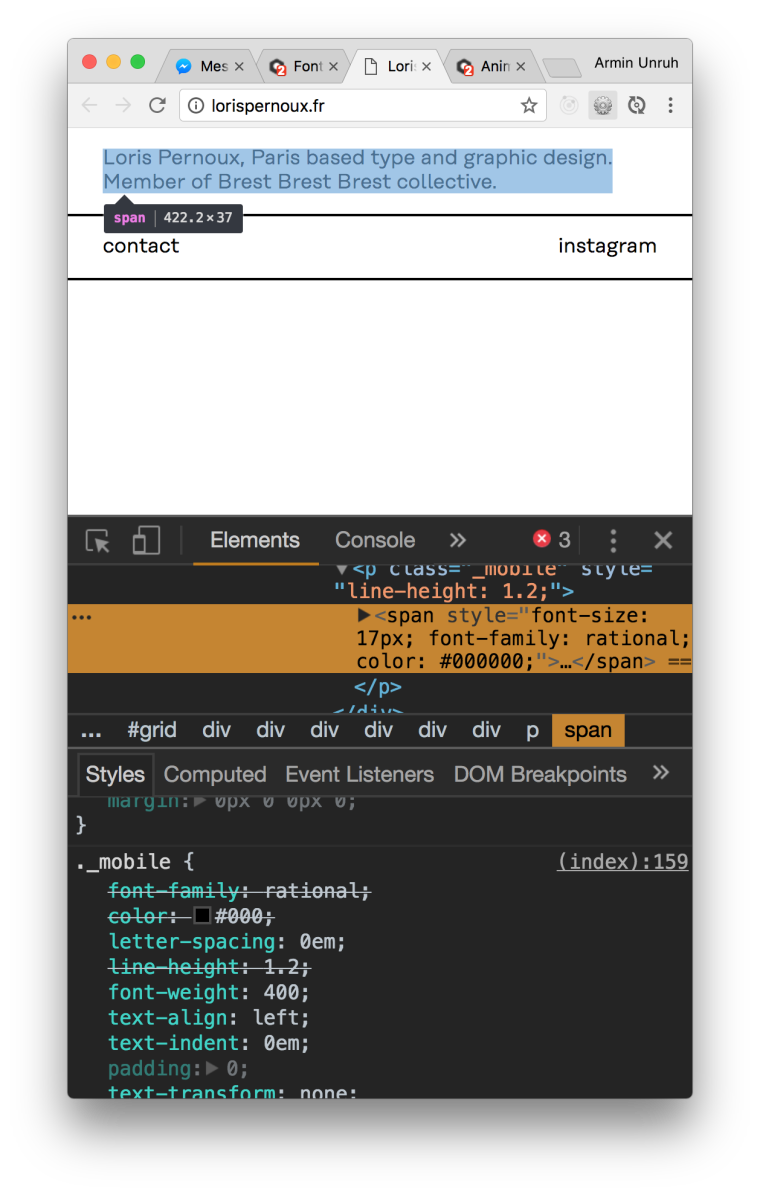
                    Seems like you set the fontsize of your text not using a textformat but using the font-size dropdown in the texteditor:
                    0_1509881130710_Screen Shot 2017-11-05 at 12.24.29.png

                    Just select your text, click the "clear formats" button and then apply a textformat.

                    1 Reply Last reply
                    0
                    • D
                      D
                      Davide
                      wrote on last edited by
                      #12

                      Thanks @arminunruh this has worked for me as well.
                      Best,
                      D.

                      1 Reply Last reply
                      0
                      • L
                        L
                        Loris
                        wrote on last edited by
                        #13

                        Hi @arminunruh and @mariusjopen,
                        Unfortunately this doesn't seem to change anything for me. The result displays the same problem… What can I do?
                        Best, Loris

                        1 Reply Last reply
                        0
                        • mariusjopenM
                          mariusjopenM
                          mariusjopen
                          Global Moderator
                          wrote on last edited by
                          #14

                          Hi Loris,

                          we will figure it out.

                          Best!

                          Marius

                          www.mariusjopen.world

                          1 Reply Last reply
                          0
                          • arminunruhA
                            arminunruhA
                            arminunruh
                            Global Moderator
                            wrote on last edited by
                            #15

                            Hey Loris!

                            Ok i looked at it with my iphone on landscape and the safari inspector for iphone and both of these texts have font-size 17, so they should look the same. I really don't know why.

                            Can you put this in your css in "lay options" -> "custom css and html" and see if it makes a difference?

                            html {
                                -webkit-text-size-adjust: 100%; /* Prevent font scaling in landscape while allowing user zoom */
                            }
                            

                            from https://stackoverflow.com/questions/2710764/preserve-html-font-size-when-iphone-orientation-changes-from-portrait-to-landsca

                            1 Reply Last reply
                            0
                            • L
                              L
                              Loris
                              wrote on last edited by
                              #16

                              Hi @arminunruh,
                              This works! Thank you very much!
                              All best,
                              Loris

                              1 Reply Last reply
                              0

                              Hello! It looks like you're interested in this conversation, but you don't have an account yet.

                              Getting fed up of having to scroll through the same posts each visit? When you register for an account, you'll always come back to exactly where you were before, and choose to be notified of new replies (either via email, or push notification). You'll also be able to save bookmarks and upvote posts to show your appreciation to other community members.

                              With your input, this post could be even better 💗

                              Register Login
                              Reply
                              • Reply as topic
                              Log in to reply
                              • Oldest to Newest
                              • Newest to Oldest
                              • Most Votes


                              Online Users
                              A
                              Anna_S
                              Forgot your key, lost your files, need a previous Lay Theme or Addon version? Go to www.laykeymanager.com
                              laytheme.com
                              • Login

                              • Don't have an account? Register

                              • Login or register to search.
                              • First post
                                Last post
                              0
                              • Recent
                              • Tags
                              • Popular
                              • Users
                              • Search
