Hello,
i used the "stack" feature to put more and different content in one row.
Let me know what your final solution is.
Best Daniel
Hello,
i used the "stack" feature to put more and different content in one row.
Let me know what your final solution is.
Best Daniel
Hello,
i did it like this. Maybe it helps:
Best
Daniel
.search-query {
  font-family: georgia;
}

.search-inputs {
  font-family: georgia;
}
Hello, Font Awesome works great with lay. I use it like that:
Sign in at font Awesome and create a free kit.
When your Kit is created you get a script code.
Copy the script code to the <head> section at lay's Custom CSS & HTML.
I use links and script in the <head> section
  <link href="/your-path-to-fontawesome/css/fontawesome.css" rel="stylesheet">
  <link href="/your-path-to-fontawesome/css/brands.css" rel="stylesheet">
  <link href="/your-path-to-fontawesome/css/solid.css" rel="stylesheet">
  <script src="https://kit.fontawesome.com/ae25ce5210.js" crossorigin="anonymous"></script>
After this i put the Font Awesome Snippet i want in the html section of my Text for example:
<p style="text-align: left;"><i class="fa fa-envelope-square fa-lg"></i> <a href="mailto:info@yoursite.de">E-Mail</a></p>
And when you want to customize each icon you can again use the Custom CSS like this:
.fa-fish {
    color: salmon;
  }

  .fa-envelope-square, .fa-calendar-check-o, .fa-map-marker-alt, .fa-link {
    color: dodgerblue;
  }

    .fa-phone-square-alt {
    color: dodgerblue;
  }

  .fa-user-ninja.vanished {
    opacity: 0.0;
  }

  .fa-facebook {
    color: rgb(59, 91, 152);
  }
@arminunruh said in Mobile Frame after Update + Burger:
.burger-wrap-default {
margin-right: 0px!important;
padding-top: 10px!important; }
Great! Thanks for your time. It is working now.
Best Daniel
Oh, great - did not see the update option in my wordpress dashboard. Update + works fine.
Any Idea concerning the burger css.
Thanks for help 🤗
Daniel
Hello Armin,
here is the link:
https://www.moinmark.de
the photo at the top is placed full width in the gridder.
hello ;)
after updating to the latest version the mobile Frame of my created pages changed the formatting and are not looking the same. Do i have to create all new?
the burger is not reacting when i try to change this:
.burger-wrap-default {
margin-right: 0px;
padding-top: 10px; }
maybe there is already a solution? Thanks for help.
Hello ;)
is there already a topic with an explanation how to customize the mobile menu points wit css?
Thanks in advance.
Daniel
www.roteliebe.tv
@mariusjopen Thank you very much. It works!!!! Have a nice weekend.
@mariusjopen please type on your mobile: www.roteliebe.tv and open the mobile menu. Thanks 👍
@mariusjopen Thanks for your answer. But this css isn't working for the mobile points in the mobile menu. It used to. In my customizer there is no option to align the mobile menu points to the left anymore. 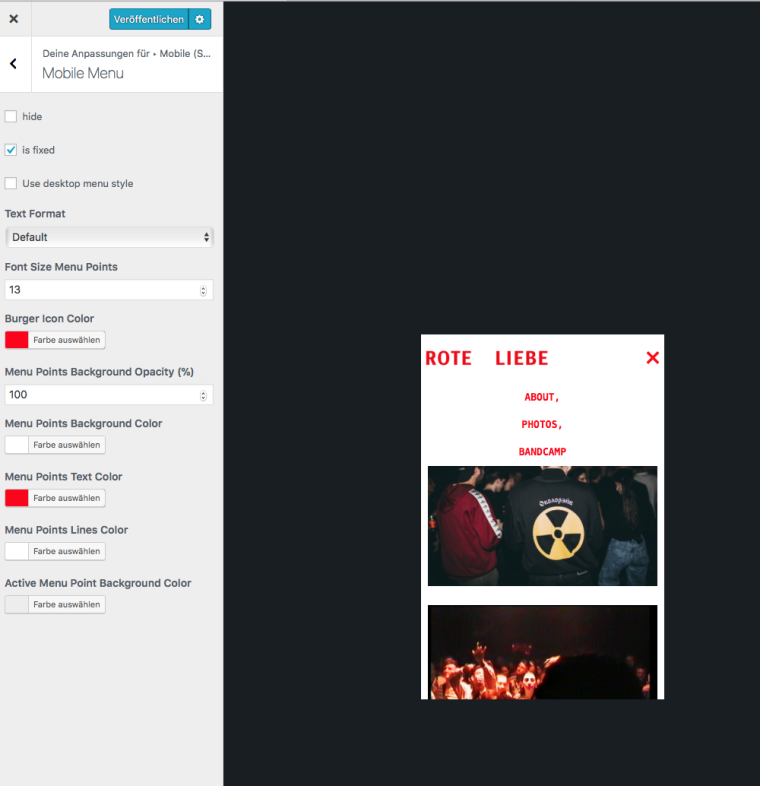
Hello,
any suggestions? I used this but it is not working anymore:
nav.primary li a{
text-align: left;
}
Best
@mariusjopen i changed it - but it seems that it's still not working. Any other idea?
Thank you
Daniel
Dear people at lay,
I use Andale Mono. Unfortunately it is not showing up mobile. Desktop works fine. Do i have to purchase it somewhere and upload it? Step by step instruction would be very helpful.
Thank you in advance.
Daniel
www.roteliebe.tv