oh and thanks! :) i missed your first line. i've actually been using laytheme for ages, and i've always been happy that it can allow me to design what i need with it. so wanted to also say thanks for that :)
A
angelalid
@angelalid
Posts
-
page overlay menu no longer opening as overlay -
page overlay menu no longer opening as overlayok thanks.
and one addition, i noticed it seems to load the menu fine sometimes, maybe when the website loads the first time but then it goes back to the error when you click the burger menu (both mobile and desktop)- the url add is indeed from woocommerce. I needed to turn on the woocommerce geolocate on the check out page because the more recent woocommerce updates gave some user interface difficulties for me on the checkout fields with their other options. It seems to have added that string after I switched to that. This (hopefully) was supposed to fix the issue i was having when people go to checkout and didn't see how to change their country easily from the default.
and thanks for the tip - i was worried laytheme needed to be updated frequently so it would always work with wordpress and woocommerce latest updates. but if you don't usually have that issue, i will hold off, after the next update with the page overlay fix. thanks again
-
page overlay menu no longer opening as overlayhttps://wildflowers.works/
desktop and mobile - chrome - mac and iphone 15
i'm not sure what update affected it, but my page overlay menu no longer works. i have page overlay turned on and correct settings, but when you click the burger menu it just opens up the page of the menu instead of opening it as an overlay - so then it also loads further down the page and below my banner at top. when the page overlay had worked before, it opened at the top level with the X close button on top right. i also tried turning off the animation option now to see if it was an issue there but it still happens whether it's on or off. i'm not sure what previous update might have affected that so i don't want to start randomly reverting back.
it had worked without issue before, and i haven't been updating other things related to it on my site and i didn't have any CSS for it. so i think it must have been in an update? thanks. -
page overlay menu after update 11.1.8thanks! well i went in and cleaned up any position custom code - i think it was conflicting with the new page overlay option settings, but once i removed my position code, i could do those same customisations in your new overlay settinsg and it all seems ok now! sorry for the trouble. thanks!
-
page overlay menu after update 11.1.8I am talking about a page overlay menu.
i've got products on sale right now so it's a bit tricky to handover and have downtime. is there other information i can provide to you somehow to see what happens?
i'm nervous to try to update to the latest again in case the problem still happens -
page overlay menu after update 11.1.8hi!
When i updated to 11.1.8 (and all after) my page overlay menu disappears half off the screen on desktop (google chrome latest) - i had to revert back to 11.1.4 - but i'd like to be able to stay updated to the latest versions. I tried clearing site cache before reinstalling but it still happened - is there anyone else with this error? or something that can be fixed so my menu will work again if i update?
thanks! -
Problem after update 11.1.8I had problems too - my menu overlays position was half off screen on the live site, and the entire site blurred out - i reverted back to my backup - it was okay in the previous update.
-
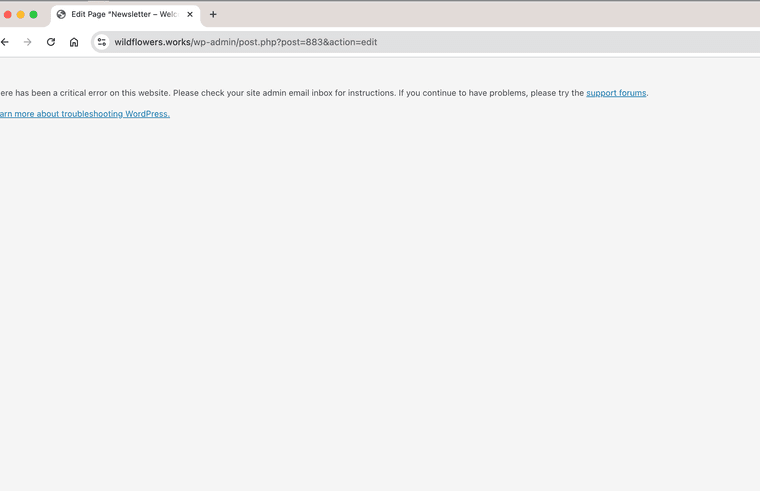
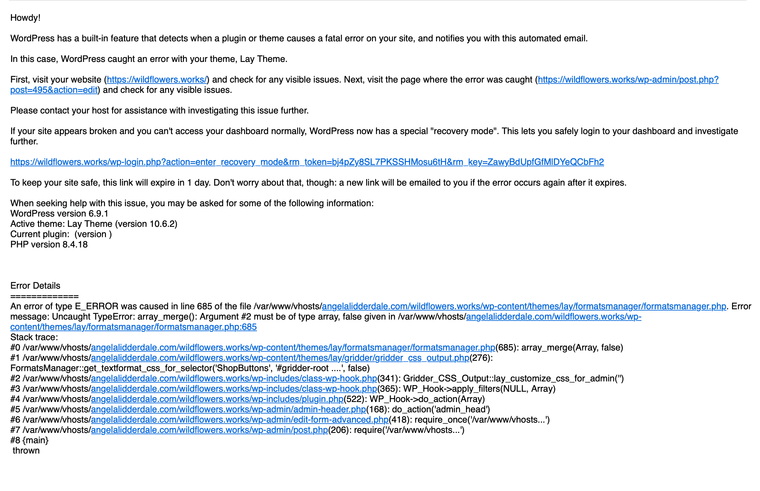
fatal error to access to edit pages in wordpress after laytheme update todayi updated the laytheme plugin this morning
So far the site itself still seems to display and work normally as far as i can tell.
and the customise and lay options pages workbut when i go to click on any page in the pages menu i get this error which triggered the wordpress fatal error message.
before i start trying to revert to the theme backups i wanted to report this in case it can be solved with an update?
i am on chrome and mac os.
-
woo commerce product grid thumbnail image rollover stopped workingafter the previous update last week, my image rollovers stopped working on my woocommerce product grid overview thumbnails on desktop. it only showed the rollover image instead of the base state image. i had had the customiser set to turn off rollovers on mobile, so on mobile it showed the original base image. i can't show the example now, as i had to delete the rollovers so that people would at least see the main images (and not the rollovers alone) - i wanted to let you know in case other people had the same issue, and hopefully an update can allow me to put the rollover image change back.
https://wildflowers.works/ -
product carousel on mobile woocommerce - circle buttons not activating on swipeHi, sorry I didn’t get an alert that you messaged. Just saw it now. I had a recent updated version but after I wrote I did another new recent update and now it is working! Thanks!
-
product carousel on mobile woocommerce - circle buttons not activating on swipeOn the product carousel on mobile woocommerce - circle buttons are not activating as I swipe from one image to the next - the first circle stays black and doesn't move as I swipe the images. I tried doing some custom codes added myself but nothing would trigger it - has anyone else had this problem? or is there another way to fix? I prefer not to use stacked images for mobile, but if the circle highlights don't move it looks like an error on the phone.
-
Element Grid & Thumbail Grid in a single columnI am suddenly having the same thing with making new element grids. the ones I had a few days ago are okay, but the new ones just go in one column, and i can't seem to find any error.