Skip to content
  • Recent
  • Tags
  • Popular
  • Users
  • Search
Skins
  • Light
  • Brite
  • Cerulean
  • Cosmo
  • Flatly
  • Journal
  • Litera
  • Lumen
  • Lux
  • Materia
  • Minty
  • Morph
  • Pulse
  • Sandstone
  • Simplex
  • Sketchy
  • Spacelab
  • United
  • Yeti
  • Zephyr
  • Dark
  • Cyborg
  • Darkly
  • Quartz
  • Slate
  • Solar
  • Superhero
  • Vapor

  • Default (No Skin)
  • No Skin
Collapse

Lay Theme Forum

daniD

dani

@dani
Unfollow Follow
About
Posts
131
Topics
47
Shares
0
Groups
0
Followers
1
Following
0

Posts

Recent Best Controversial

  • Draggable elements
    daniD dani
    General Discussion

    hi,

    like this : http://danielcampbell.ca/post-it
    ???

    add this to 'custom HTML at top' :

    <script src="https://code.jquery.com/ui/1.12.1/jquery-ui.js"></script>

    <script>

    window.laytheme.on("newpageshown", function(layoutObj, type, obj){

    jQuery( function() {
    jQuery(".post").draggable();
    } );

    /* click div to bring to front */
    jQuery(function() {
    var maxz = jQuery('.post:last').css("zIndex");
    jQuery(".post").on("drag",function(){
    maxz++;
    jQuery(this).css('z-index',maxz);
    } );

    /* fade in divs - set .post to opacity:0; /
    jQuery('.post').each(function(i) {
    jQuery(this).delay((i++) * 500).fadeTo(1000, .99).css({"margin-left":i
    100, "margin-top":i*100});
    } );

    /* close parent div on x */
    jQuery('.close').on("click", function () {
    $(this).parent('div').fadeOut();
    });
    });
    });
    </script>

    and this to CSS
    (modify as your like) :

    /* post-it */
    .post {
    z-index: 1;
    position: absolute;
    width: 300px;
    min-height: 200px;
    padding: 20px;
    opacity: 0;
    overflow: scroll;
    background-color: #ffffbc;
    cursor: grab;
    cursor: -webkit-grab;
    }
    .close {
    display:inline-block;
    }
    .close::after {
    content: "\00D7";
    text-align: right;
    display:inline-block;
    position: absolute;
    font-size: 30px;
    font-weight: 100;
    right: 12px;
    top: 0px;
    width: 20px;
    height: 20px;
    z-index: 3;
    color: black;
    }
    div.close:hover:after {
    color: red;
    }

    Have fun :D


  • Thank you!
    daniD dani
    General Discussion

    armin,

    thank you for the work you do on LAY theme!
    it's brilliant.

    yoroshiku.png Screenshot 2025-03-15 at 11.22.07 PM.png


  • Changing Background Image
    daniD dani
    General Discussion

    Hi Lee,

    I've tried to do this as well with the carousel, but it's kind of a hack.

    You can always use the same script on the site and add it to your custom css/html.

    I extracted the essentials for you here:

    http://codepen.io/cestdani/pen/bWGBgE

    Note that when you add javascript you'll need to read this:
    http://laytheme.com/documentation.html#custom-javascript

    also use 'jQuery' instead of the '$' shorthand for wordpress compatibility.

    Best,
    Dani


  • How to integrate CSS into text area
    daniD dani
    General Discussion

    Hi Forum,

    I wrote a little bit of CSS to fade in/out an image in a absolute positioned div when hovering over text.

    It works in an isolated environment :
    http://codepen.io/cestdani/pen/LWQNxO

    but when integrated into LAY it doesn't work anymore.
    http://visuel.org/XAMP/test-caption-image

    Could you tell me how I could integrate this code, or suggest another way to do this?

    I tried the same idea with jquery, but still doesn't work when trying to integrate.

    http://codepen.io/cestdani/pen/mWXOrj
    http://visuel.org/XAMP/test-caption-image-2

    Thanks!
    Daniel


  • Using carousel feature as a cover (or full row bg image)
    daniD dani
    General Discussion

    Hi Armin,

    I'm wondering if there is a easy way to combine the code for a carousel and cover feature.
    ie. I want to have a fading slideshow that functions just a cover (fills the browser width and height).
    Or if there is a way to adjust the carousel with css so it adjusts to 100vh/100vw, that could work too.
    (something like an option on the carousel instance 'use as full row bg image).

    Here is the carousel without left/right margins, but there is still a bottom margin but the browser edge is as an absolute boundary, unlike a cover or full row bg image.

    http://visuel.org/sg

    Thank you!
    Dani


  • youtube autoplay solution
    daniD dani
    General Discussion

    It's tricky, but here is a solution.
    This code:

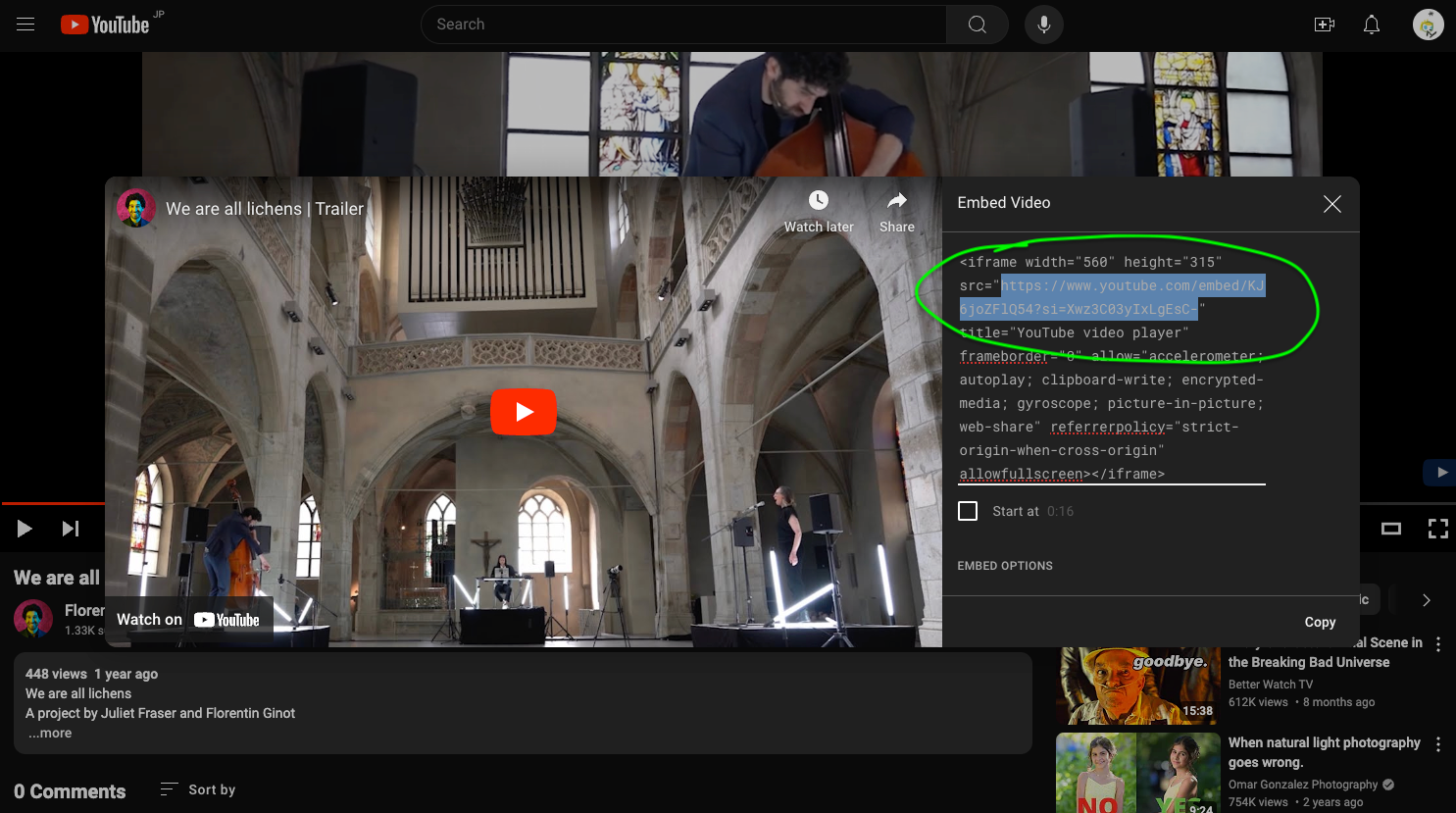
    <iframe width="100%" height="800px" src="https://www.youtube.com/embed/KJ6joZFlQ54?si=Xwz3C03yIxLgEsC-&autoplay=1&mute=1" title="YouTube video player" frameborder="0" allow="accelerometer; autoplay; clipboard-write; encrypted-media; gyroscope; picture-in-picture; web-share" allowfullscreen></iframe>
    

    replace URL with the embed code on youtube (not the share url). Here:
    Screenshot 2024-06-20 at 12.58.49 PM.png

    Working example:
    https://florentinginot.com/en/we-are-all-lichens/


  • Webfont font family avoiding faux-bold/italics
    daniD dani
    General Discussion

    Hi Forum,

    I Want to use the font family Garamond (included on Mac).
    The webfont is a backup for those who don’t have Garamond on the system (the mac default version).
    So I converted and uploaded the files.

    garamond.woff
    garamond-italic.woff
    garamond-bold.woff

    PROBLEM: faux italics, faux bold

    I want Garamond to act as a font-family with specific character sets for italic and bold.

    I found this article that proposes a fix:

    http://www.metaltoad.com/blog/how-use-font-face-avoid-faux-italic-and-bold-browser-styles

    And here is my CSS

    • {
      font-family: ‘Garamond’;
      -webkit-font-smoothing: antialiased;
      -moz-osx-font-smoothing: grayscale;
      }

    @font-face {
    font-family: ‘Garamond’;
    src: url('http://www.anneslacik.com/wp-content/uploads/Garamond.woff');
    font-weight: normal;
    font-style: normal;
    }
    @font-face {
    font-family: Garamond;
    src: url('http://www.anneslacik.com/wp-content/uploads/Garamond-Italic.woff');
    font-weight: normal;
    font-style: italic;
    }
    @font-face {
    font-family: Garamond;
    src: url('http://www.anneslacik.com/wp-content/uploads/Garamond-Bold.woff');
    font-weight: bold;
    font-style: normal;
    }

    I left the Text Format font feild blank.

    So my questions:

    1. Is there a way to do this within the text formats?
    2. is this going to cause any conflicts?

    Thanks,
    Daniel


  • Accordeon-feature or plugin?
    daniD dani
    General Discussion

    @dani example:
    http://66.199.141.101/~dbvincze/works/


  • Accordeon-feature or plugin?
    daniD dani
    General Discussion

    try this:

    HTML

    <div class="more">Click here for more info</div>
    <div class="less">Here is the hidden content</div>
    

    Use <div> instead of <p>, so that you can use <p> within the hidden content.

    CSS

    /* open close dots - see JS */
    .more:hover:after { 
        content: " ○○○";
    }
    .more:after {
        content: " ●●●";
    }
    .less { 
      display:none; 
    }
    

    JS

    <script>
    window.laytheme.on("newpageshown", function(layoutObj, type, obj){
        
    /* open close dots */  
        jQuery('.more').click(function(){
            jQuery(this).next().slideToggle();
            jQuery('.less').not(jQuery(this).next()).slideUp();
        });
      
    });
    </script>
    

  • Q Translate X is DEAD?
    daniD dani
    General Discussion

    @Richard I'm trying it out now... thanks


  • How to Menu Dropdown?
    daniD dani
    General Discussion

    @sidyou

    put this in your desktop CSS, and then add sub menu items in 'menus'

    nav.primary .sub-menu {
    display: none;
       position: absolute;
       left: -10px;
       top: 40px;
       padding: 10px;
    
    }
    nav.primary .sub-menu li{
       display: block;
       padding-bottom: 5px;
    }
    .menu-item:hover .sub-menu{
       display: block !important;
    }
    li.menu-item-has-children{
       position: relative;
    }

  • sticky
    daniD dani
    General Discussion

    @Sophie1000 Hi Sophie, there are almost some solutions, but nothing that works easily and without some little bugs... did you find anything? Please let me know. Thanks


  • Change Text while scrolling
    daniD dani
    General Discussion

    Waypoints does this...
    http://imakewebthings.com/waypoints/

    Ex in LAY, add/remove a CSS class on the 'index' : https://kiti.ca/kitty-care

    Doesn't work as well on mobile... working on it.


  • Hover on text with image showing
    daniD dani
    General Discussion

    it's too much work!
    it could be useful to add some kind of hover function in laytheme, since many people ask for it.


  • Z index fixed element
    daniD dani
    General Discussion

    adding 0's to z-index doesn't help ;)

    i've had this issue and solved it before,

    send the site url, with the code. i'll take a look.


  • site title as scroll to top button
    daniD dani
    General Discussion

    thank you marius,

    sure, that is a solution.


  • Specifying javascript/html for individual pages
    daniD dani
    General Discussion javascript

    there is definitely a bug somewhere

    when i visit http://visuel.org/clouds from this link it works fine (except when screen size is changed or console comes up... it disappears)

    but when the clouds page is accessed from the main page http://visuel.org (link at bottom of page), nothing shows up.

    i don't see the CSS or JS in the source either...

    please advise,
    thanks!


  • Flying Sidecart
    daniD dani
    Shop / WooCommerce

    thank you very much!


  • Extra info suddenly added in links
    daniD dani
    Bug Reports

    Hi forum,

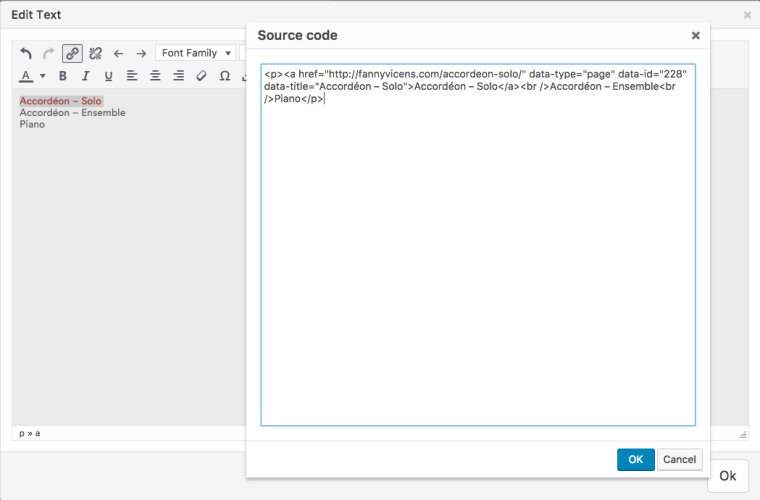
    All of the sudden this info (data-type="page" data-id="228" data-title="Accordéon – Solo") is added into the code when creating links. I reset the permalinks, but that didn't do anything.

    When I remove the data info the link works but the whole page refreshes (unlike before when the code didn't include this info). If I leave it as it it works fine but I'm wondering why this suddenly is happening.

    0_1490794512682_Screen Shot 2017-03-29 at 15.31.24.png

    Thanks,
    Daniel


  • expand/collapse row inside a marquee (not working)
    daniD dani
    Bug Reports

    It works, thank you Armin!

  • Login

  • Don't have an account? Register

  • Login or register to search.
  • First post
    Last post
0
  • Recent
  • Tags
  • Popular
  • Users
  • Search