Thx! Works fine ;)
D
Dawid
@Dawid
Posts
-
The "fixed header" function does not work with the Polylang plugin. -
Stutter animation on the phone when using "Cover" optionHi @arminunruh . Sorry for the delay. Unfortunately, nothing has changed—the animation is still not smooth and stutters. I checked it in version 11.8.3; I have currently disabled the cover feature for mobile.
-
The "fixed header" function does not work with the Polylang plugin.argoth.pl
macOS SafariHi!
- The fixed header does not appear on pages translated by the Polylang plugin.
- It is not possible to create a second "fixed header" with a translation in another language – only one fixed header can be created.
PS
I think creating a few "fixed headers" for different subpages would be a cool solution for the future :)
Best,
Dawid -
Stutter animation on the phone when using "Cover" optionhttps://hosting249247.a153b.netcup.net
Safari iOS 27When using the "Cover" option, the animation on the phone isn't smooth and stutters while scrolling. Is there a way to fix this? :)
Best,
Dawid -
problem with background and mix-blend-mode: difference for menuAmazing :) Thx!
-
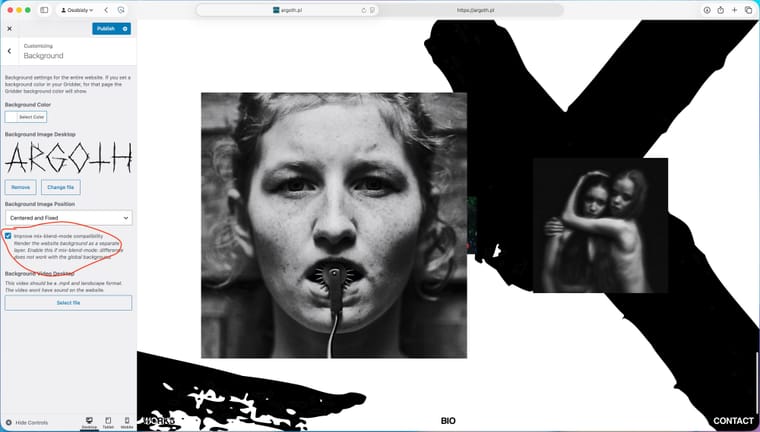
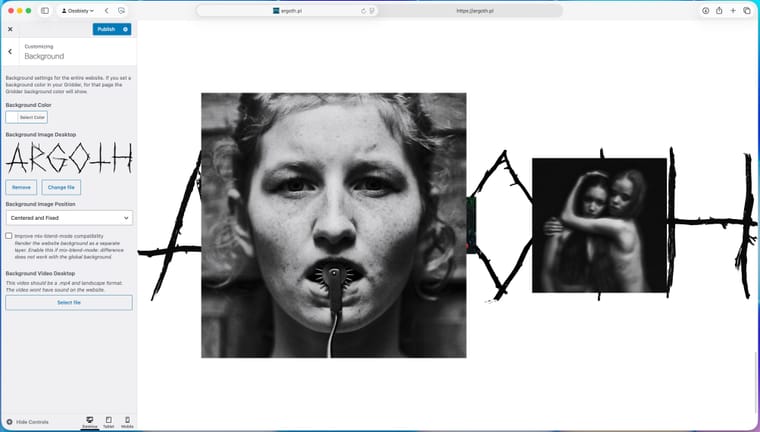
problem with background and mix-blend-mode: difference for menuHi! @arminunruh - I did an update, and there's still one small bug. When I select "Centered and fixed" and enable the "Improve Mix-Blend-Mode" feature, the background stretches instead of centering.
-
problem with background and mix-blend-mode: difference for menuThank you Armin as always and thx for kind words! :)
-
problem with background and mix-blend-mode: difference for menuwww.argoth.pl
Safari / iMacI'm having a problem with the background and the "Make Texts mix-blend-mode: difference" feature for the menu. If I set the background globally (in "Apperance/Customize")—in my case, a large centered logo—and add a white background color, the "mix-blend-mode: difference" feature doesn't work, and the menu becomes invisible. However, if I add a background color directly on a specific page, the feature works, but it covers up the background I set globally (in "Apperance/Customize"). Unfortunately, when I set the background on a specific subpage, I can’t adjust its settings (stretched, centered, etc.)
Is this a bug in LayTheme or am I doing something wrong? :)
-
Side Cart + lay theme problem (ugly graphics)Thank you Armin :)
-
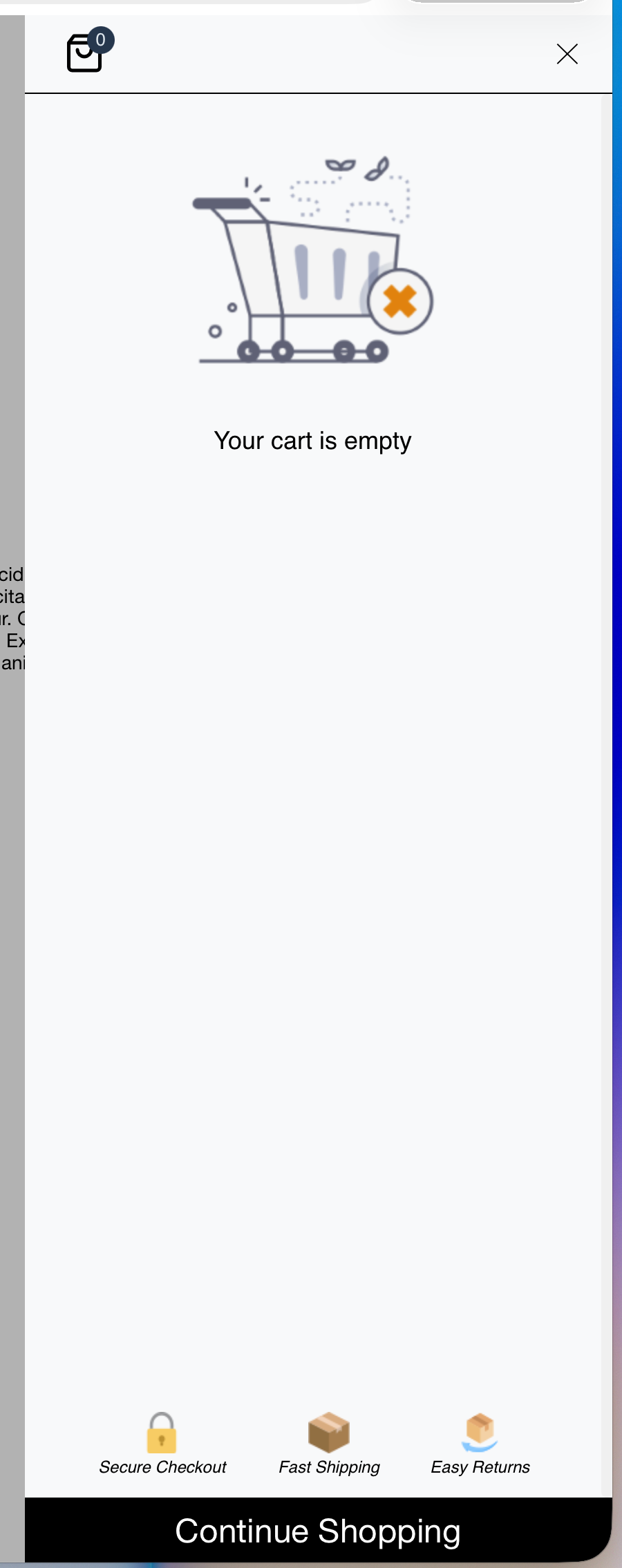
Side Cart + lay theme problem (ugly graphics)I installed Lay Theme + Woo Commerce and added the Side Cart plugin. Does anyone know what’s going on here right now? :D I don’t know how to get rid of those ugly graphics from Side Cart. I remember that after I installed it, the shopping cart used to look really nice and stylish it matched the Lay Theme. Is there a way to get rid of these graphics? Unfortunately, there isn't much you can do from within the plugin...
-
Blurry custom cursors in Safari – Any way to get vector-sharp quality?Thx @arminunruh . I updated it and it's better, but the problem still persists. :)
-
Blurry custom cursors in Safari – Any way to get vector-sharp quality?@arminunruh I’ve tested the feature and it’s working - the cursors look perfect now :) However, I’m experiencing some lag, and the mouse cursor stutters when switching between pages. Could this be a conflict with the fullscreen slider?
Check: https://evermore.studio
-
Blurry custom cursors in Safari – Any way to get vector-sharp quality?Great news! I was away for a moment - I'll check it out right away :) Thx
-
Blurry custom cursors in Safari – Any way to get vector-sharp quality?Has anyone found a solid workaround for the custom cursor scaling issue in Safari?
I’m trying to get cursors to render in high quality—ideally pin-sharp, just like a vector file. I was wondering if it's possible to use fonts for this?
It’s incredibly frustrating because creating custom cursors for things like carousels (e.g., using "NEXT" / "PREVIOUS" text as a cursor) currently feels impossible. The text ends up looking pixelated and blurry, which ruins the UI.
@arminunruh – do you know if there’s any way to force Safari to render these properly?
Thanks!
-
Row Video Background from Vimeo?Wow! Amazing work bro! <3 Thank you very very much! :)
-
Row Video Background from Vimeo?@arminunruh Sounds good :) My client would really like his projects to open in full screen with the option to turn on sound. They don't have to start automatically—we can use the video player that comes with LayTheme. I've temporarily used “Row Video Background,” but if the video player could be stretched to fill the entire browser window, that would be great and would solve all the problems.
Here you can see the website:
https://warsawproduction.com/PS
I think this small feature could potentially open LayTheme up to websites for production houses and video artists ;)
-
Row Video Background from Vimeo?@arminunruh ok, I understand. And if I insert a Vimeo video normally (not as a “Row Background Video”), can I use CSS to set the video to fill the entire browser window? (e.g., 100vw, 100vh)
-
Row Video Background from Vimeo?bump bump ;)
-
Row Video Background from Vimeo?@arminunruh Thank you very much! Works great :)
PS
Last question - if I use “Row Video Background” is it possible to load with sound?
-
Row Video Background from Vimeo?I have a client who runs a video production company. He has a large portfolio, but hosts his videos on Vimeo. He showed me a solution he would like to implement on his new website, and it seemed feasible to me using laytheme. It involves using “Row Video Background,” but with externally hosted files (Vimeo). Is this feasible? Is there a solution that will allow me to implement fullscreen videos from external hosting?
PS
I asked him why he cared so much about Vimeo hosting, and he replied that it greatly speeds up his work because Vimeo automatically compresses his files and the service itself works very quickly.