Thanks!!!
E
emmapasteur
@emmapasteur
Posts
-
Multiple fonts -
Multiple fontsHey!
I am currently creating a onepage website for my client.
As the visual identity of the brand comprises 2 typefaces, each in multiple weights, I am wondering how I can find a way to incorporate them in Laytheme. I usually use "Use Any Font" addon, but the free option only allows you to use one personal font...Thanks a lot for your help!
-
broken links btw english and french pages with PolyangI have no idea, but someone helped me and I just needed to hit the "pencil" button next to the language of the page and choose which page is the english/french version. Thanks!
-
Possible to copy paste a layout from a page to an other ?Thank you very much 🙏
-
broken links btw english and french pages with PolyangHey, I recently experienced broken links between english and french pages I created with Polylang. Do you know how I can restore them without having to recreate the whole page and layout ?
-
Possible to copy paste a layout from a page to an other ?Do you use Polylang addon ? How do you connect the pages together ? thank you vm
-
Possible to copy paste a layout from a page to an other ?I did that for most of the pages, but in the case of languages versions of the page (I use the Polylang addon) it is not working bc Laytheme opens up a new empty page and you can't choose to keep your layout...
-
Possible to copy paste a layout from a page to an other ?Hey,
I am designing a website for my client, and I would like to make her as autonomous as possible. She is not very familiar with laytheme and needs to spend as little time as possible on it. I am then looking for a solution to allow her to copy paste a layout from a page to an other. It seems to be not possible but I don't know if someone has an idea or solution ?
Thank you vm for your help
-
Custom HTML not reloading on AJAX navigationI just realized I have the same problem for my menu and website name, because I used HTML to control this as well. What is weird is it worked perfectly before I added code for my 2 viewport images of home page
-
Custom HTML not reloading on AJAX navigationHey, thank you for your help. Here is the link to my website :
You will notice that I have 2 images on the home page adapting to the viewport size. I couldn't manage to do this with laytheme so I added code. My problem is : it is working perfectly until I browse the website and click on "Anaïs Fernon" at the top left of my website to go back to the home page : I do land on the home page, but my HTML disappears, so I no longer see my two featured images; I only see the content that's supposed to be below them.
Do not hesitate if this isn't clear. Thank you very much
-
Specific image hover size and positionPerfect :)) thks have a nice day
-
Custom HTML not reloading on AJAX navigationHii !
I'm using Laytheme and I've added a custom HTML div in the "Custom HTML at top" section of my homepage. It contains two images that fill the viewport on desktop.
The issue is that when I navigate through the site using AJAX navigation and then click on the site title (logo) to go back to the homepage, my custom div doesn't appear. I have to do a full page reload to see it again.
I assume this is because the custom HTML injected at the top of the body is not re-injected when AJAX navigation occurs.
Is there a way to disable AJAX navigation site-wide, or is there a hook/event I can listen to in order to re-inject my custom HTML after each AJAX page load?
Thanks in advance for your help!
-
bar to separate menu elementsThank you so much.
-
bar to separate menu elementsI can't find the "html at bottom" window you are talking about... thank you very much for your help
-
bar to separate menu elementsI tried yes... but as i said i can't manage to center it between the words
-
bar to separate menu elementsHi ! Do you have an idea how I could add vertical bars to separate the elements of my menu as shown on the image ?
I tried to add it before the words but as every element is independant the bar is never centered...Thank you vm

-
Grey unused language in the menuHere is the solution :
.laynav.desktop-nav .lang-item:not(.current-lang) a {
opacity: 0.4;
} -
Grey unused language in the menuHello! I’ve used Polylang to create my bilingual website. I’d like to grey out the unused language in the menu, as shown in the image below. Do you know how I could do this?
Thank you very much!! -
Specific image hover size and positionHey! Thank you for replying. I had the time to finally find a solution. Here is the code I used if someone is interested:
.lay-imagehover-on-element .lay-image-responsive {
width: clamp(150px, 20vw, 500px) !important;
height: auto !important;
position: fixed !important;
top: 320px !important;
right: 40px !important;
transform: none !important;
} -
Specific image hover size and positionI've added a hover image to my list, but I'd like to be able to control the size and position of the image.
Here is the link to my page : https://anaisfernon.com/home-copy/?lay_preview=true&preview_post_id=171&preview_nonce=289f672cee&t=1779099505967
I'd like them all to appear in the same spot, as shown in the photo below:
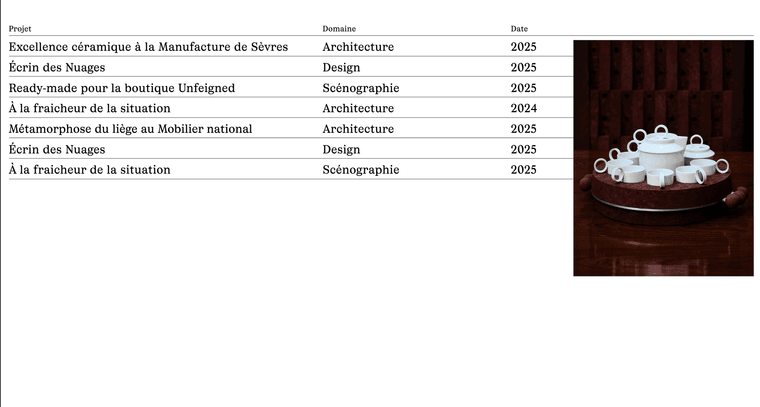 ``
``Could you please help me finding a solution ? Thank you...
