Skip to content
  • Recent
  • Tags
  • Popular
  • Users
  • Search
Skins
  • Light
  • Brite
  • Cerulean
  • Cosmo
  • Flatly
  • Journal
  • Litera
  • Lumen
  • Lux
  • Materia
  • Minty
  • Morph
  • Pulse
  • Sandstone
  • Simplex
  • Sketchy
  • Spacelab
  • United
  • Yeti
  • Zephyr
  • Dark
  • Cyborg
  • Darkly
  • Quartz
  • Slate
  • Solar
  • Superhero
  • Vapor

  • Default (No Skin)
  • No Skin
Collapse

Lay Theme Forum

P

pvicente

@pvicente
Unfollow Follow
About
Posts
11
Topics
4
Shares
0
Groups
0
Followers
0
Following
0

Posts

Recent Best Controversial

  • WooCommerce: Product images not displayed in Orders/Emails with Lay Theme
    P pvicente
    Shop / WooCommerce

    Could this update have disabled the 'New Order' confirmation emails to the admin? I think the customer emails are fine, but I'm no longer receiving notifications when a purchase is made. They were working before.

    I've performed a 'send a test email' for both 'completed order' to the customer (which arrives fine) and 'New order' to the admin (which is not arriving)

    Thank you as always for your help.


  • Favicon Not Showing on Frontend, Works on /wp-admin (No Active Cache)
    P pvicente
    General Discussion

    @arminunruh Agreed! Thank you very much for looking into it. I thought that might be the case, but I was waiting for a long time and started to have doubts/questions.

    Thanks again!


  • Favicon Not Showing on Frontend, Works on /wp-admin (No Active Cache)
    P pvicente
    General Discussion

    Captura de pantalla 2025-10-13 a las 15.05.36.png


  • Favicon Not Showing on Frontend, Works on /wp-admin (No Active Cache)
    P pvicente
    General Discussion

    Hello everyone, and thank you in advance for your help. I'm hoping someone has an idea of what might be happening with my website.

    When I log into the site as an admin via /wp-admin, the correct favicon that I set in the site settings appears. However, when I visit the website as a normal user (in an incognito window, for example), the favicon doesn't show up (the default browser icon appears instead).

    What could be causing this? I do not have any active caching plugins installed, nor is caching enabled on my hosting provider. I have also tried temporarily disabling security plugins and clearing my browser's cache completely.

    When I check the browser inspector, the correct images seem to be referenced and loading, but they are simply not displayed in the browser tab.

    Any thoughts or suggestions would be highly appreciated!


  • WooCommerce: Product images not displayed in Orders/Emails with Lay Theme
    P pvicente
    Shop / WooCommerce

    Thank you so much!


  • WooCommerce: Product images not displayed in Orders/Emails with Lay Theme
    P pvicente
    Shop / WooCommerce

    Hi everyone! Thanks for your responses.

    Regarding the new update fixing this issue: thank you so much! I really appreciate your quick handling of this.

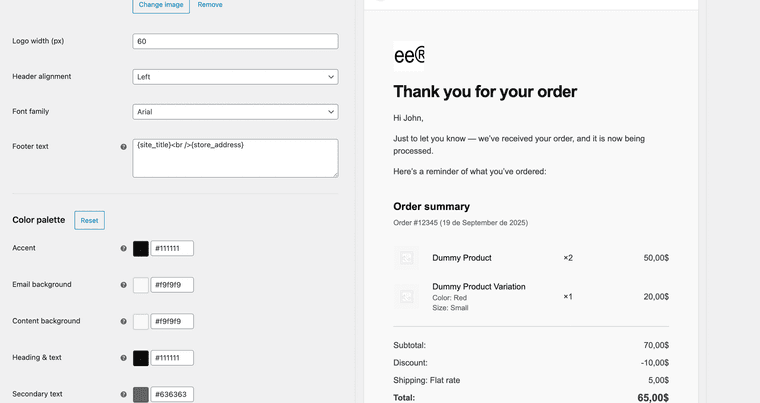
    In relation to how to show the image in emails, to be honest I have no idea. I thought it was always there! lol I don't know where you activate it, but in WooCommerce/settings/emails, at the bottom where the template example appears, it shows up with the images directly.

    Captura de pantalla 2025-09-19 a las 19.40.05.png


  • Product images not displayed in Orders/Emails with Lay Theme
    P pvicente
    Bug Reports

    Ah okay! No worries. Hope you can get it fixed soon. Thanks for your work


  • Product images not displayed in Orders/Emails with Lay Theme
    P pvicente
    Bug Reports

    Re: WooCommerce: Product images not displayed in Orders/Emails with Lay Theme


  • WooCommerce: Product images not displayed in Orders/Emails with Lay Theme
    P pvicente
    Shop / WooCommerce

    Hello everyone,

    I'm hoping to get some help with an issue I'm facing regarding WooCommerce product images.

    When Lay Theme is active, the product thumbnails are not showing up in the WooCommerce > Orders admin view, nor in the customer/admin order notification emails. Instead, I only see the default placeholder image (the landscape icon).

    Here is the interesting part: I ran a test by switching to a default WordPress theme (like Twenty Twenty-Four), and when I did, the product images in those same past orders appeared correctly in the order details.

    This seems to suggest that the order data, including the correct product image, is being saved to the database correctly. However, it appears that Lay Theme is unable to retrieve and display this image when viewing the order. I have run this test with all other plugins disabled.

    Could you please provide some insight into what might be causing this display issue? Is this a known incompatibility?

    Thank you for your time and help.


  • Gridder not working!
    P pvicente
    General Discussion

    Hi! I finally resolved it installing wordpress from 0. Thank you so much!


  • Gridder not working!
    P pvicente
    General Discussion

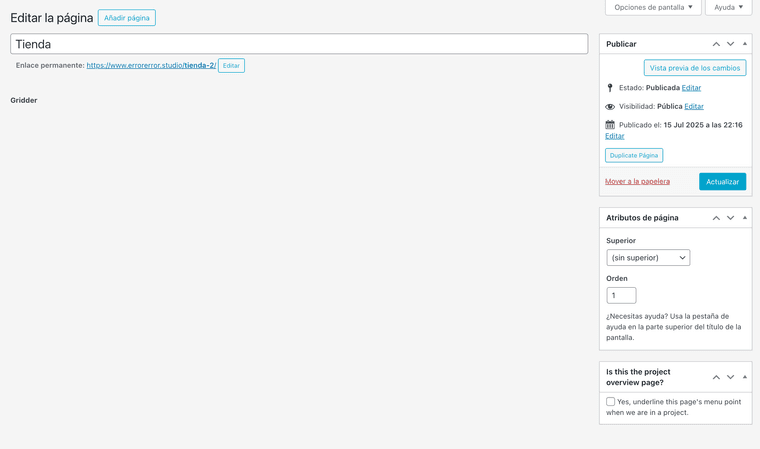
    Captura de pantalla 2025-07-15 a las 23.44.48.png

    I tried deactivating plugins, updating WordPress and php, clearing the cache, and following all the recommendations, but nothing happens. can you help me? thanks!

  • Login

  • Don't have an account? Register

  • Login or register to search.
  • First post
    Last post
0
  • Recent
  • Tags
  • Popular
  • Users
  • Search