Nice! Thanks armin! I am going to test it asap, I guess it will released in 11.8.2?
 R
R
rv
@rv
Posts
-
germanized plugin will break category and tag filters -
germanized plugin will break category and tag filtersHi all,
I have some trouble using the newest Germanized Woocommerce Version. After updating, the Category and tag filters of laytheme are not working anymore, (see details below and video attached as private link).
I downgraded the Germanized plugin to the same versions of my DEV environment and the issue was gone; Version v4.0.11 or higher will lead to the issue again. (Current Version is 4.1.3)@Development team:
- Can you check this on your environment and do you have any clue why it acts so strange? I will contact vendidero as well and will hopefully be able to update to the newest version, soon.
- Do you know an alternative for injecting / placing an image to the checkout / cart page? (regarding this: https://vendidero.de/eu-gewaehrleistungs-und-garantie-label-fuer-woocommerce)
Laytheme Woocommerce Product Thumbnail Filters will break:
- Using any category filter on a Product Thumbnail Grid wont change the according articles in the list. Instead, the gallery disappears for a sec, appears again and nothing is filtered. It just shows all articles.
- In addition to that: it shows all products even though they are prefiltered in the thumbnail settings in the gridder.
- A click on a tag filter will hide the tags fully, nothing will change at all.
Browser
Chrome, Safari, via Desktop or mobileHow to reproduce
- Deactivate / Activate the Plugin at Version 4.0.11 or higher
- Important ( and I really dont know how long it took to figure this step out ) You need to change something in the customizer and publish it, e.g. changing the start page. Only this step kind of refreshed / cleared some caches.
Temporary Solution
- Downgrade to 4.0.10
Current environments
DEV: WP 7.0, Laytheme 11.4.5, Germanized 4.0.6
QAS: WP 7.1.2, Laytheme 11.8.0, Germanized 4.0.10Cheers!
Robin -
Anchor scroll doesn't work in project overlayI face a similar behaviour on a page of my site. A laybutton with the #id will not jump to the anchor. When hovering I see the link target with #id at the bottom of my browser, but when I click the button, the URL will not change.
Requesting the site manually will jump to the anchor. But: there is no animation happening and no offset applied, even though the values are set in the Lay Options.
-
imagehover Version 1.3.1 — Class "MiscOptions" not foundJust found this in the debug.log
[05-Nov-2023 15:38:44 UTC] PHP Fatal error: Uncaught Error: Class "MiscOptions" not found in […]wp-content/plugins/laytheme-imagehover/laytheme-imagehover.php:488
-
Search as icon instead of text?Not a high-customized solutions, but at least you could use default icons / uniocode emojis. Not sure about the impact on SEO, tho.
-
FILTER Categories showing all projects@beucccia
To refine a thumbnail grid / results, I see two ways- Using dedicated sites with thumbnail grids
You could use menus / sub-menus pointing to thumbnail grids with specific categories filtered, e.g.
WORK
Sub-Menu: PHOTOGRAPHY
Link to Site showing Thumbnail Grid with filter PHOTOGRAPHYSub-Menu: DESIGN
Link to Site showing Thumbnail Grid with filter DESIGN--> This way requires users to switch between "sub-categories" in the menu
--> It also means, you have to set up multiple thumbnail grids- Using tags
As far as I know, the original use of categories is to link only 1 category to a project (I read that this is also better for SEO). Tags can be used multiple-times on 1 project/site, etc.
In the thumbnail grid the default of tag filters is "OR". E.g. you have a project that can be assigned to a photography, but also shows interior, you can assign the tags photography and interior.
--> This ways allows to have basic categories and tag bubbles right on one site, users can filter at one place
--> You need to make sure your projects fit into this meta-structure - Using dedicated sites with thumbnail grids
-
Gridder hides content / thumbnail gridAll plugins & custom scripts are inactive
Occures in version 6.3.2, but also did in 6.3.1There are contents hidden in the gridder, but still visible on the front-end.
Example:
I created a site with a thumbnail grid. When doing so, everything works fine. I can place and edit the grid as usual.
Note: The "null" element on the screenshot is an example.
Right after saving and re-opening:
The gridder is empty, or at least it hides the content of the grid.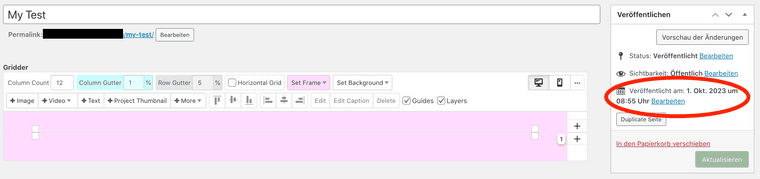
There is still a chance to edit the thumbnail grid, by clicking on the anchor points of the thumbnail grid (or what is left of it)
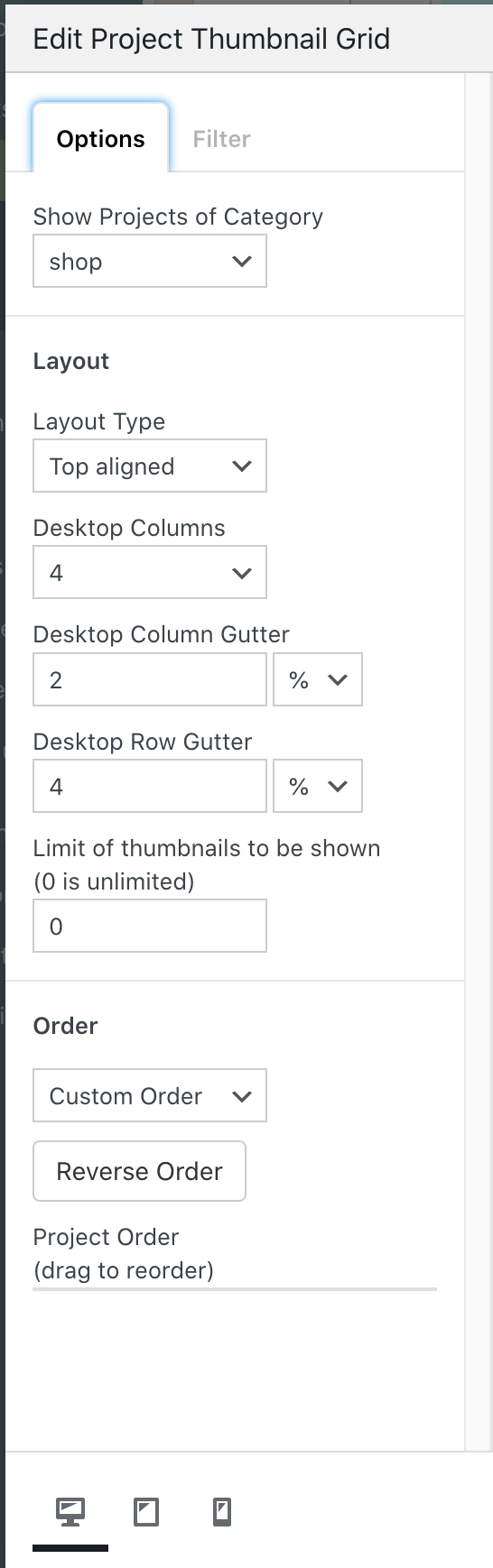 Doing so, even the edit-menu does not show any content any more.
Note: I am trying to make a structure that is identical between WooCommerce and projects. The sites and grids are projects, not product thumbnails.
-
6.3.2 Failed to load plugin url ... tinymce_fontloader.jsAll plugins & custom scripts are inactive
When editing a page I get this error next to the gridder
Failed to load plugin url: [removed-by-rv]/wp-content/themes/lay/fontmanager/assets/js/tinymce_plugin/tinymce_fontloader.js?ver=6.3.2