Skip to content
  • Recent
  • Tags
  • Popular
  • Users
  • Search
Skins
  • Light
  • Brite
  • Cerulean
  • Cosmo
  • Flatly
  • Journal
  • Litera
  • Lumen
  • Lux
  • Materia
  • Minty
  • Morph
  • Pulse
  • Sandstone
  • Simplex
  • Sketchy
  • Spacelab
  • United
  • Yeti
  • Zephyr
  • Dark
  • Cyborg
  • Darkly
  • Quartz
  • Slate
  • Solar
  • Superhero
  • Vapor

  • Default (No Skin)
  • No Skin
Collapse

Lay Theme Forum

  1. Home
  2. Bug Reports
  3. Overflow-y not hidden on captions-wrap

Overflow-y not hidden on captions-wrap

Scheduled Pinned Locked Moved Bug Reports
23 Posts 4 Posters 3.1k Views 4 Watching
  • Oldest to Newest
  • Newest to Oldest
  • Most Votes
Reply
  • Reply as topic
Log in to reply
This topic has been deleted. Only users with topic management privileges can see it.
  • S
    S
    samuel.t
    wrote on last edited by
    #9

    Are you're sure you're running the latest theme? When looking at your page, the fix with "overflow-y: hidden" is not there. When adding it manually through the developers console, the page looks fine.

    L 1 Reply Last reply
    0
    • S samuel.t

      Are you're sure you're running the latest theme? When looking at your page, the fix with "overflow-y: hidden" is not there. When adding it manually through the developers console, the page looks fine.

      L
      L
      lilievongruen
      wrote on last edited by
      #10

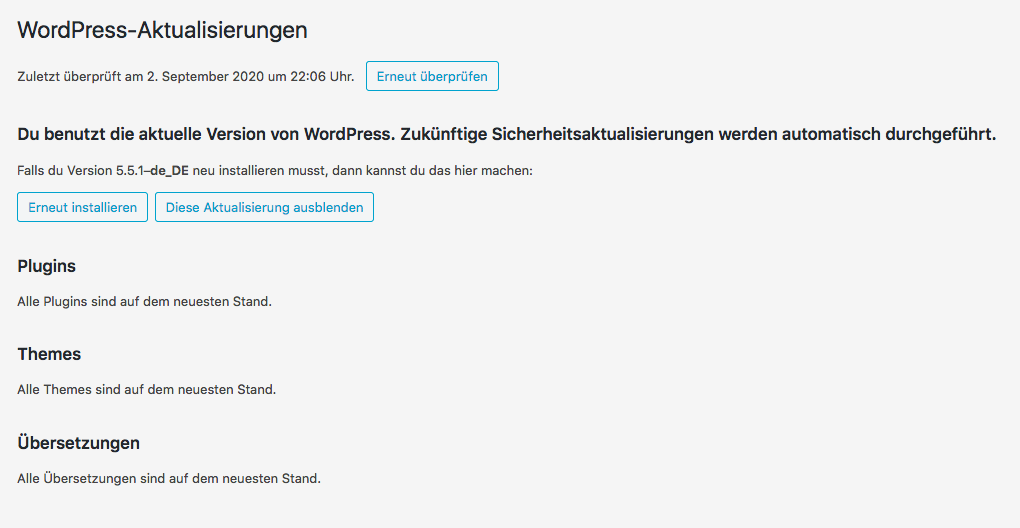
      Hi @samuel-t, there is no update available and I am running lay theme 3.4.5.
      Bildschirmfoto 2020-09-03 um 00.07.30.png

      I uninstalled the plugin Simple Post Notes…no change so far.

      1 Reply Last reply
      0
      • S
        S
        samuel.t
        wrote on last edited by
        #11

        @arminunruh : looks like another class selection is needed:

        .lay-carousel-sink .single-caption {
        overflow-y: hidden;
        }
        

        .single-caption instead of .captions-wrap

        L 1 Reply Last reply
        0
        • S samuel.t

          @arminunruh : looks like another class selection is needed:

          .lay-carousel-sink .single-caption {
          overflow-y: hidden;
          }
          

          .single-caption instead of .captions-wrap

          L
          L
          lilievongruen
          wrote on last edited by
          #12

          Thank you @samuel-t, it works on Firefox. Safari is still showing the scrollbar.

          1 Reply Last reply
          0
          • RichardR
            RichardR
            Richard
            Global Moderator
            wrote on last edited by
            #13

            Dear @samuel-t

            Thanks for following up again and providing interest in this,
            I will forward this for further inspection

            @lilievongruen
            As a 'Must ask" part of debugging, do you have:

            • any third party plugins that when de-activated change the issue?
            • any Custom CSS, HTML or JS/jQuery code that when temporarily removed changes the issue?
            • ( as mentioned before :) , Both the Theme and the Theme's Addon's are all up to date.

            Let me know and come to a solution,
            Until then @lilievongruen thank you for using Lay Theme and your patience

            Best wishes and a nice weekend

            Sincerely
            Richard

            L 1 Reply Last reply
            0
            • RichardR Richard

              Dear @samuel-t

              Thanks for following up again and providing interest in this,
              I will forward this for further inspection

              @lilievongruen
              As a 'Must ask" part of debugging, do you have:

              • any third party plugins that when de-activated change the issue?
              • any Custom CSS, HTML or JS/jQuery code that when temporarily removed changes the issue?
              • ( as mentioned before :) , Both the Theme and the Theme's Addon's are all up to date.

              Let me know and come to a solution,
              Until then @lilievongruen thank you for using Lay Theme and your patience

              Best wishes and a nice weekend

              Sincerely
              Richard

              L
              L
              lilievongruen
              wrote on last edited by
              #14

              Dear @Richard-Keith,

              as you suggested, I did temporarily deactivate third party plugins and removed all custom css. The scrollbar was still showing up in Safari.

              Third party plugins are:
              Google Analytics for WordPress by MonsterInsights
              Really Simple SSL

              Thank you for further inspection!

              1 Reply Last reply
              0
              • RichardR
                RichardR
                Richard
                Global Moderator
                wrote on last edited by Richard
                #15

                Dear @lilievongruen

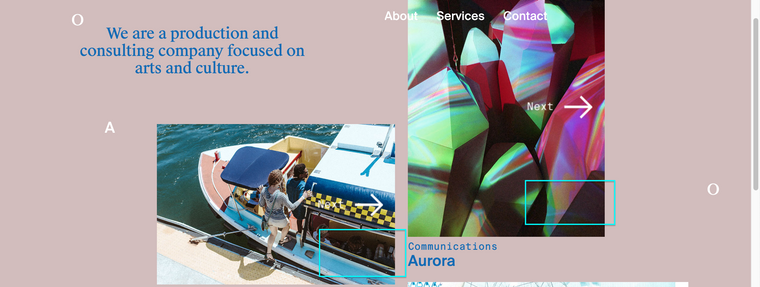
                I am inspecting your website and do not see the Scroll bars that have been an issue,
                Did you update & the problem is solved?
                Screen Shot 2020-09-08 at 2.12.18 PM.png

                Would love to know the end result if you are able :)

                Also any additional question's that may still be causing you issue.

                Best Wishes
                Richard

                L 1 Reply Last reply
                0
                • S
                  S
                  samuel.t
                  wrote on last edited by
                  #16

                  .single-caption now has an attribute "overflow-y: hidden". Not sure if this has been inserted with some custom CSS or is from a theme update.

                  L 1 Reply Last reply
                  0
                  • RichardR Richard

                    Dear @lilievongruen

                    I am inspecting your website and do not see the Scroll bars that have been an issue,
                    Did you update & the problem is solved?

                    Screen Shot 2020-09-08 at 2.12.18 PM.png

                    Would love to know the end result if you are able :)

                    Also any additional question's that may still be causing you issue.

                    Best Wishes
                    Richard

                    L
                    L
                    lilievongruen
                    wrote on last edited by
                    #17

                    Dear @Richard-Keith and @samuel-t
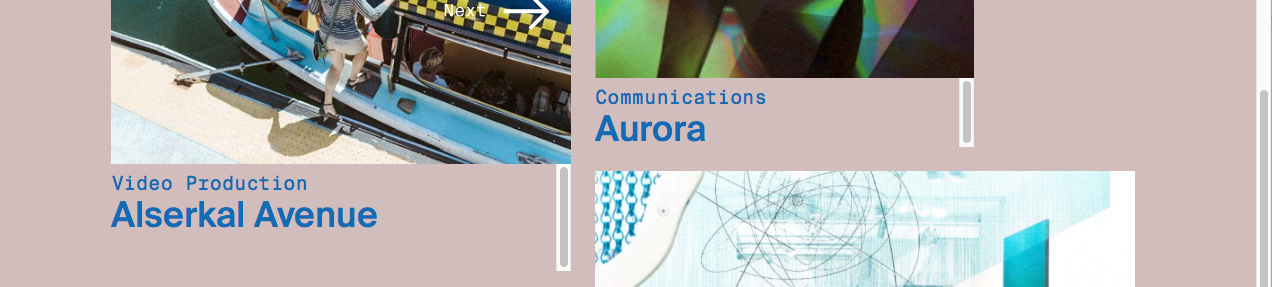
                    the issue is still appearing in Safari, but not in all screen sizes, so when I changed the size of the browser window I got different results.
                    Bildschirmfoto 2020-09-08 um 14.38.29.png

                    Thank you, best, Susann

                    1 Reply Last reply
                    0
                    • S samuel.t

                      .single-caption now has an attribute "overflow-y: hidden". Not sure if this has been inserted with some custom CSS or is from a theme update.

                      L
                      L
                      lilievongruen
                      wrote on last edited by
                      #18

                      Dear @samuel-t the attribute "overflow-y: hidden" has been added by custom css. Theme is up to date.

                      1 Reply Last reply
                      0
                      • RichardR
                        RichardR
                        Richard
                        Global Moderator
                        wrote on last edited by Richard
                        #19

                        Dear @lilievongruen

                        Could you please send your website address, /wp-admin/ username and password and a link to this topic to info@laytheme.com?

                        At this point it is the best way forwards.

                        Sincerely
                        Richard

                        L 1 Reply Last reply
                        0
                        • RichardR Richard

                          Dear @lilievongruen

                          Could you please send your website address, /wp-admin/ username and password and a link to this topic to info@laytheme.com?

                          At this point it is the best way forwards.

                          Sincerely
                          Richard

                          L
                          L
                          lilievongruen
                          wrote on last edited by
                          #20

                          Dear @Richard-Keith, I just send you an email…thank you!

                          1 Reply Last reply
                          0
                          • arminunruhA
                            arminunruhA
                            arminunruh
                            Global Moderator
                            wrote on last edited by
                            #21

                            hey if you update the carousel addon now, this should be fixed!

                            1 Reply Last reply
                            0
                            • L
                              L
                              lilievongruen
                              wrote on last edited by
                              #22

                              Dear @Armin-Unruh & @Richard-Keith,
                              it works now. Thank you!

                              Best, Susann

                              1 Reply Last reply
                              0
                              • RichardR
                                RichardR
                                Richard
                                Global Moderator
                                wrote on last edited by
                                #23

                                Dear @lilievongruen

                                Amazing!
                                Thank you for posting to confirm your success as this help other's as well.

                                Have a wonderful day and thank you for using Lay Theme

                                Best Wishes
                                Richard

                                1 Reply Last reply
                                0

                                Hello! It looks like you're interested in this conversation, but you don't have an account yet.

                                Getting fed up of having to scroll through the same posts each visit? When you register for an account, you'll always come back to exactly where you were before, and choose to be notified of new replies (either via email, or push notification). You'll also be able to save bookmarks and upvote posts to show your appreciation to other community members.

                                With your input, this post could be even better đź’—

                                Register Login
                                Reply
                                • Reply as topic
                                Log in to reply
                                • Oldest to Newest
                                • Newest to Oldest
                                • Most Votes


                                Online Users
                                L
                                lstark
                                Forgot your key, lost your files, need a previous Lay Theme or Addon version? Go to www.laykeymanager.com
                                laytheme.com
                                • Login

                                • Don't have an account? Register

                                • Login or register to search.
                                • First post
                                  Last post
                                0
                                • Recent
                                • Tags
                                • Popular
                                • Users
                                • Search
