This will be where we talk about shop issues and questions and feedback.
 A
A
arminunruh
@arminunruh
Posts
-
Hey everybody! -
Link to Anchor from another pageOk so I have an image in page1 and I give it an ID.
You can also give a row an ID, doesn't matter. Right click -> set html class and id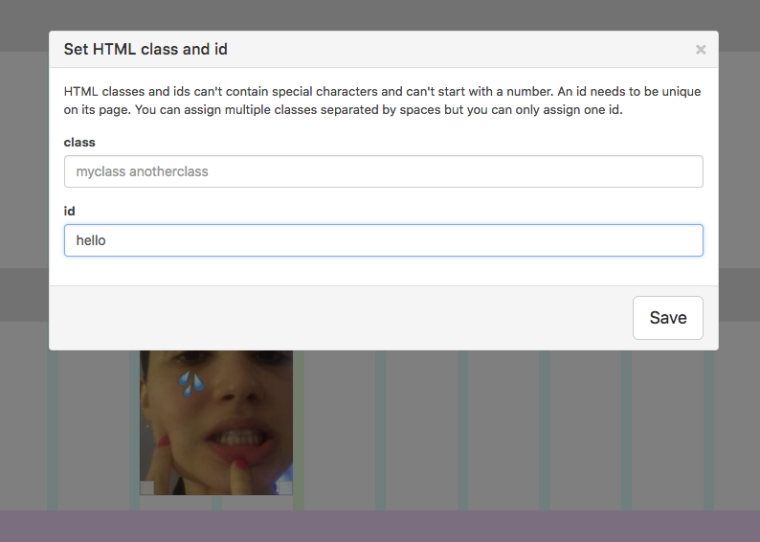
Now on another page, I create a link. Here I create a link on an image, but you could also create a link when you edit text. The important part is "#hello".
"hello" is the id that I set before.
Now I think Marius' code is probably right, maybe the problem was just that the easing named 'easeOutSine' doesn't exist. Not 100% sure here.
Add the following code to "Lay Options" -> "Custom <head> content":<script> window.laytheme.on('newpageshown', function(){ if(window.location.hash.length > 0){ var id = window.location.hash; if(jQuery(id).length > 0){ jQuery('html, body').animate( { scrollTop: jQuery(id).offset().top }, { duration: 1200 }); } } }); </script>That code above is cool cause it works for all pages
-
Update Problem 4.9.2 to 4.9.3yea it was a bug, i didnt set the correct version in one file. now with 4.9.4 thats fixed
-
Color for individual row gutterHey! That's not possible right now. But I think it's a really good idea, so I will code that one day.
-
Lazy load with blurred previewwill be included with the next update
-
Blog integration?yea im going to start working on the blog feature now!
-
Lazy load with blurred previewtheres no way you can do that, however, i've been thinking of coding this as an option for lay theme and it is still on my list
-
Functional tags in Lay Themehey so with the new update, projects will have body classes like category-1 category-2 where the number is the id of the category
-
Feature request: Stack inside of another stackwhat i need to code is to be able to have multiple elements in one line in a stack i think
-
Responsive font sizeYeah, I think it would be good to be able to either define font sizes in px or in vw. When defined as vw, the font size resizes with the browser. https://css-tricks.com/viewport-sized-typography/
Should only be used for big text though. Small text could become way too small at a certain size. Like here: http://shop.mango.com/iframe.faces?state=he_004_AL
:scream:Edit: In version 1.022 the font-size can now be set in % in Text Formats and the Customizer
-
Product Categories/Tags Filtersits on my todo list
-
Fade Effect / Smooth Transitions Links via "Custom HTML“Can you post the link or send it to info@laytheme.com with a link to this topic please?
One reason could be that a shortcode is in use on the page that you link to.
To make shortcodes work, the whole website needs to refresh, so you won't have a smooth transition. -
hide second menuah i understand! will be fixed with the next update
-
Code Snippet: make captions on carousel follow mouseI just coded this snippet to make captions in a carousel follow the mouse cursor.
Its for someone's Lay Theme website. I got this request by email and yea I wanted to share it here in case someone wants to do this too.It only works for type "Slide". The user had this config for their carousel:
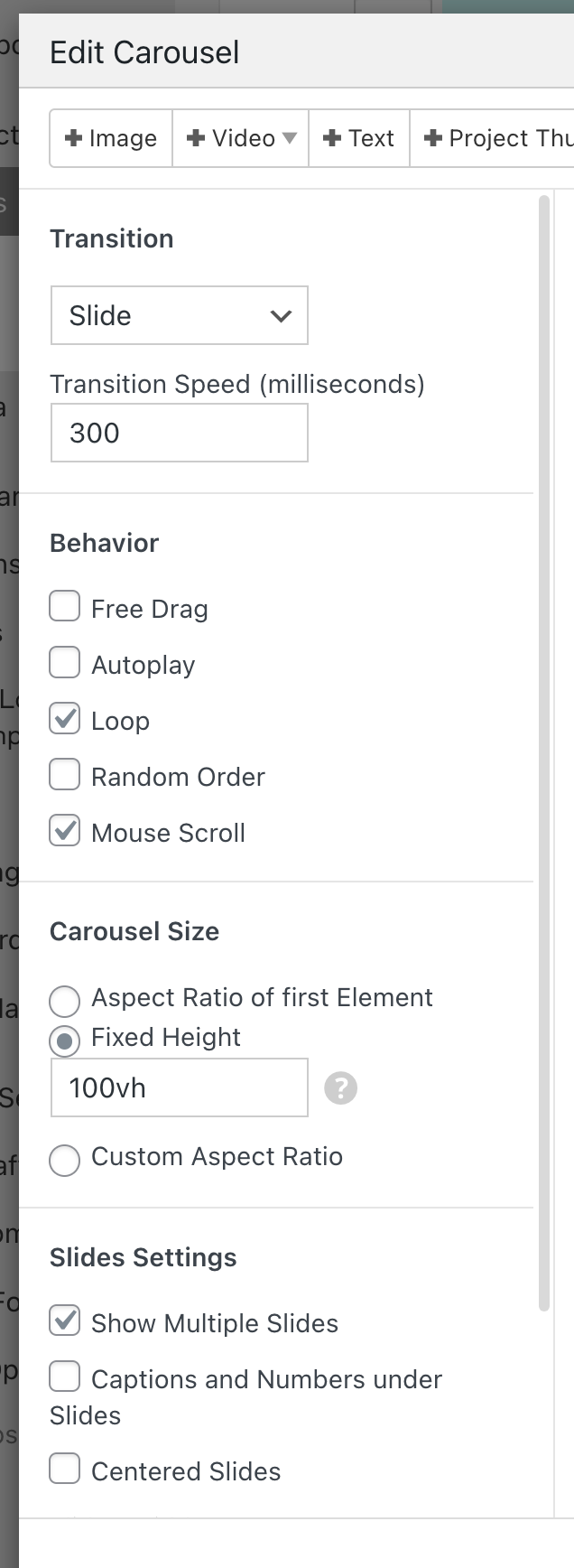
Add this javascript into "Lay Options" -> "Custom CSS & HTML" -> "Custom HTML at bottom":
<script>
    var currentIx = -1;

    var reset = function(e){
        currentIx = -1;
        jQuery(".fixed-caption").remove();
        jQuery(window).off('mousemove wheel', doFollow);
    }

    var doFollow = function(e){
        var el = document.elementFromPoint(e.clientX, e.clientY);
        var $slide = jQuery(el).closest(".lay-carousel-slide");
        if($slide.length > 0){
            var ix = $slide.attr('data-swiper-slide-index');
            if(ix != undefined && ix != currentIx){
                currentIx = ix;

                var $wrap = $slide.closest('.lay-carousel-wrap');
                var $caption = $wrap.find('.single-caption.ix-'+ix);
                jQuery(".fixed-caption").remove();
                if($caption){
                    var $clone = $caption.clone();
                    $clone.css({
                        'position': 'fixed',
                        'top': 10,
                        'left': 10,
                        'zIndex': 98,
                        'pointer-events': 'none'}).addClass('fixed-caption')
                    jQuery("body").append($clone);
                }
            }
            jQuery('.fixed-caption').css('transform', 'translate('+e.clientX+'px, '+e.clientY+'px)');
        }
    }

    window.laytheme.on('newpageshown', function(){
        if(window.utility.isTouchDevice){
            return;
        }
        reset();
        //if(jQuery("body").attr('data-id') == 282){
            jQuery(".lay-carousel-sink-parent").hide();
            jQuery(window).on('mousemove wheel', doFollow);
        //}
    })
</script>
on a touchdevice, this does nothing. as we dont have mouse cursors on touch devices :)
-
Converting pages into projectsoh yes of course!
the second phase where i copy over the custom phone layout gridder json:
thats only needed if you do have a custom phone layout for that page -
Rounded corners.lay-carousel{ border-radius: 20px; overflow: hidden; } .type-elementgrid .img{ border-radius: 20px; overflow: hidden; } -
make image caption follow mouse!enter this in lay options → custom css & html → custom <head> content:
<script>
    var $caption;
    jQuery(document).on('mouseenter', '.col.type-img', function(e){
        //console.log(e);
        $caption = jQuery(e.currentTarget).find('.caption');
    })
    jQuery(document).on('mouseleave', '.col.type-img', function(){
        console.log('mouseleave');
        $caption.css('display', 'none');
        $caption = null;
    })

    var offset = 10;
    jQuery(document).on('mousemove', '.col.type-img', function(e){
        console.log('mousemove');
        if($caption != null){
            $caption.css({'display': 'block', 'top': e.clientY + offset, 'left': e.clientX + offset});
        }
    })
</script>
enter this in "custom css for desktop":
.no-touchdevice .col.type-img .caption{
    position: fixed;
    display: none;
    z-index: 99;
}
now in the gridder, add an image in your layout, select it and click "edit caption" button.
add a caption. now on your website the caption will follow your mouse. -
When will "sticky" become STICKY?ah yes you're right.
i will work on it! -
Start gif/video mouse hover in project thumbnailgo to lay options
there is a setting for project thumbnail videos
then in customize -> project thumbnails
there are settings for playing a video on mouseover
try that -
Split screen website Thumbnail grid hides active projectok can u update lay theme now
go to lay options, scroll down, and uncheck
"Hide current Project from Thumbnailgrid"