Skip to content
  • Recent
  • Tags
  • Popular
  • Users
  • Search
Skins
  • Light
  • Brite
  • Cerulean
  • Cosmo
  • Flatly
  • Journal
  • Litera
  • Lumen
  • Lux
  • Materia
  • Minty
  • Morph
  • Pulse
  • Sandstone
  • Simplex
  • Sketchy
  • Spacelab
  • United
  • Yeti
  • Zephyr
  • Dark
  • Cyborg
  • Darkly
  • Quartz
  • Slate
  • Solar
  • Superhero
  • Vapor

  • Default (No Skin)
  • No Skin
Collapse

Lay Theme Forum

K

kasuma

@kasuma
Unfollow Follow
About
Posts
3
Topics
3
Shares
0
Groups
0
Followers
0
Following
0

Posts

Recent Best Controversial

  • cart layout / big vertical menu conflict
    K kasuma
    Shop / WooCommerce cart layout vertical menu

    Hello

    I’m building a new website with the lay theme and so far i really like how this is working out but there’s one situation that’s a bit of a struggle: it’s the cart. Unfortunately, with the big menu i’m working with, the cart is of no use at the moment. Is it possible to change the cart layout so that the two boxes are not next to each other but vertically arranged?

    Here’s the shop/page – to see the problem, please add the tshirt to the cart and the go to the cart: lay.gusmology.com

    And here’s a screenshot of how the cart looks right now (the important stuff is unklickable behind the menu):
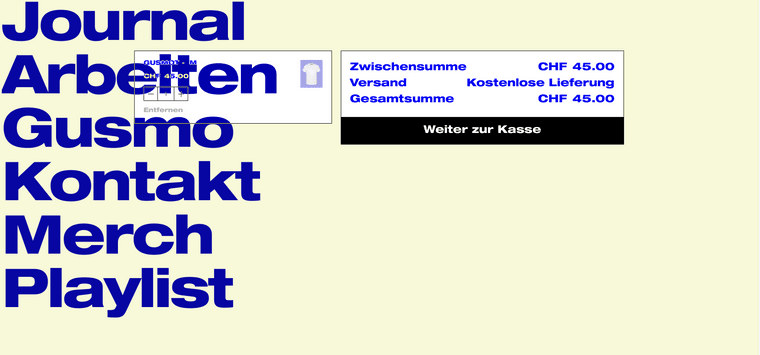
    Bildschirmfoto 2023-05-15 um 15.28.08.png

    looking forward hearing back soon
    fabi

  • Use the «+» and «-» for changing size when placing images
    K kasuma
    General Discussion

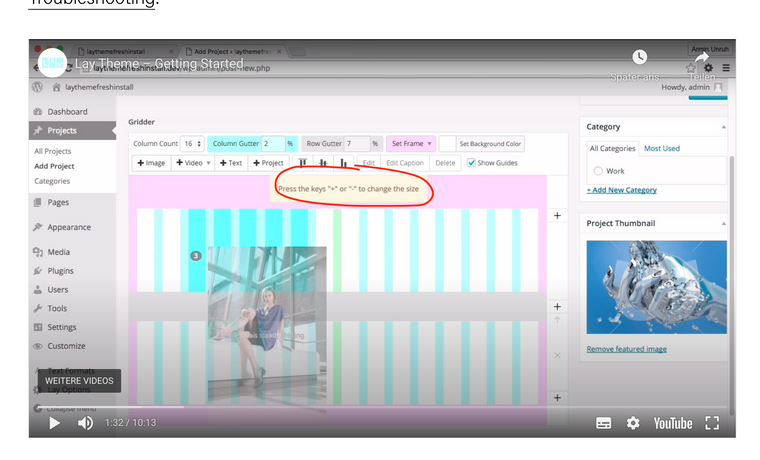
    This question is probably a bit stupid but i not able to change the size of images when placing in a project. The help text says, «Press the keys "-" or "+" to change size»

    Since i’m working with a macbook, i dont have designated keys for «+» or «-» like on a big keyboard.

    does anyone know the key combination for this? I thought, its «shift»+«cmd»+«1» and «shift»+«cmd»+«-» but this is not really working.

    74d27123-07c3-4b5f-9146-e5732e6fcead-image.png

  • Login

  • Don't have an account? Register

  • Login or register to search.
  • First post
    Last post
0
  • Recent
  • Tags
  • Popular
  • Users
  • Search