Never mind ☝️, I think it has something to do with cookies, history, etc. I looks fine on other people's mobile.
N
nypaloto
@nypaloto
Posts
-
thumbnail Videos are not displayed on the mobile Version -
thumbnail Videos are not displayed on the mobile VersionI seem to have a similar issue. The .mp4 project thumbnails don't show up on mobile the home page, see https://beige.company
All I did was add a new project, like I did many times before without problems.Interestingly, they show up once you navigate to another page, e.g. https://beige.company/info/, and then back to the home page. But disappear again after refreshing the home page.
Any idea what could be the issue?
-
project overlay to cover menuI'd like a project overlay to cover (hide) the site title and menu, so there is only the closing "X" visible when viewing a project overlay. Is that possible? Thanks!
-
link of search resultHello! Is there a way to get a link of a search result? E.g., I'd like to show on one page all the work we did for client 'ABC'. So I'd search for 'ABC', and then send the search results as a link.
Possible? Thanks!
-
Imagehover on mobileAm a bit confused about seeing Imagehover widths and heights settings for tablet and phone in Lay Options (WP admin). Does this mean it should work on mobile? If yes, how can I activate this?
Thanks!
Alex -
Safari 15.0 (beta MacOS Monterey): .mp4 autoplay stopped workingJust a heads up, all my .mp4 autoplay thumbnails videos stopped working after the latest update to Safari 15.0 (17612.1.28.5). This is on macOS Monterey Version 12.0 Beta (21A5506j).
All works fine on Chrome.
I understand this is beta, so am not pointing any fingers. I'm not even sure if this has something to do with Lay Theme, or not.
Cheers!
-
backbone.radio.min.js.map & swiper.min.js.map not there 404Am having the same issue (https://beige.company). Has there been a solution to the issue?
Thanks!
-
New CDN - webfont not working anymoreThis is likely not an issue with Lay, but I'm hoping someone can still point me in the right direction.
My host switched to Cloudflare as their CDN (previously Key CDN). As per the host instructions, I changed the css font link from using the previous KeyCDN link, to simply using the following:
@font-face {
  font-family: 'Graphik Regular';
  font-style: normal;
  font-weight: 400;
  src: url('https://beige.company/wp-content/fonts/Graphik-Regular-Web.woff2') format('woff2'),
     url('https://beige.company/wp-content/fonts/Graphik-Regular-Web.woff') format('woff');
  font-display: swap;
}
I then removed and re-added the webfonts in Lay via the Font Manager, using the following info:
Font name: Graphik_Regular
<link href="https://beige.company/wp-content/fonts/fonts.css" rel="stylesheet" type="text/css">
font-family: 'Graphik Regular';
However, this does't work, even after clearing all caches several times.
Any idea what could be the issue? FYI, I currently switched all fonts to Helvetica. My site is https://beige.company
Thanks!
-
Multilanguage problem with home page (Polylang)There's another thread about (what I think) is the same issue, and a solution that seems to work:
http://laythemeforum.com/topic/2972/lay-theme-and-polylang_front-page?_=1604310822638
-
Video thumbnail - vertical 9x16Hello. Is there a way to use a vertical (9x16) video as thumbnail in a thumbnail grid? I tried doing it as usual, but the video gets cropped into a 16x9 video in the grid.
See the 1st project/thumbnail here: https://beige.company
Thanks!
-
Grider – stripes under the pictures (Y-Parallax)Unfortunately, this didn't seem to have solved the problem. Still persists.
-
Multi language does not work at Homepage with Polylang plug in -
Grider – stripes under the pictures (Y-Parallax)Having the same issue. See https://beige.company

-
Lay Theme and Polylang_Front PageUnfortunately, I can't help with this. But the solution I posted came directly from Polylang's support, so I'd reach out to them. Good luck!
-
Webfont issue: 2 fonts working fine; 3rd one doesn'tSo, in the end, this seems to have been a caching issue - at least that's my guess. I cleared the cache (server-side), and the font works now correctly. All good!
-
Webfont issue: 2 fonts working fine; 3rd one doesn'tAnd by the way, this is my site: https://beige.company
Thanks!
-
Webfont issue: 2 fonts working fine; 3rd one doesn'tHello. In the past, when launching the site, I added 2 custom fonts using the "Add by "<link>" tag and CSS" method, via Lay Options > Webfonts. Everyone worked and works perfectly fine.
Now I wanted to add a 3rd font, using the exact same way, but this time, Lay does not recognize the font. Here's what I've done (same thing as with the first 2 fonts):
Font name: 'Graphik Semibold'
Woff files: Graphik-Semibold-Web.woff and Graphik-Semibold-Web.woff2-
Font files uploaded to wp-content/fonts
-
CSS added to fonts.css:
@font-face { font-family: 'Graphik Semibold'; font-style: normal; font-weight: 600;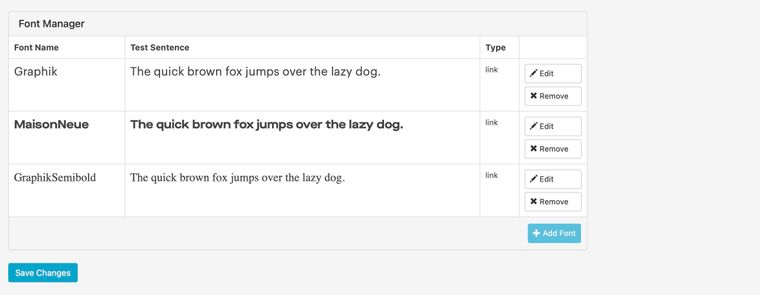 src: url('https://mk0beigexkd3qtegpvl.kinstacdn.com/wp-content/fonts/Graphik-Semibold-Web.woff2') format('woff2'), url('https://mk0beigexkd3qtegpvl.kinstacdn.com/wp-content/fonts/Graphik-Semibold-Web.woff') format('woff'); font-display: swap; }Note that the src:url points to the CDN, that's where the fonts are located. Again, this is the same as with the previous 2 fonts.
-
In Lay Options > Webfonts, added the font using the "Add by "<link>" tag and CSS".
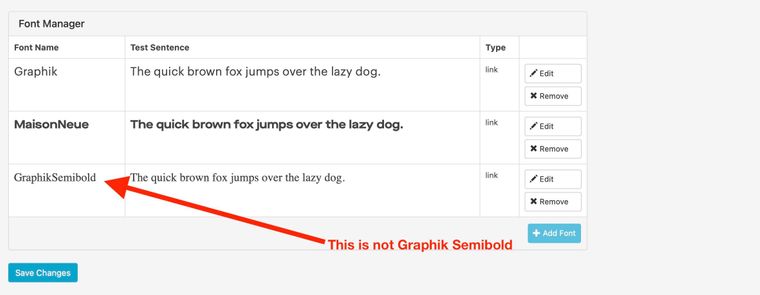
Font name: GraphikSemibold
Link tag: <link href="https://mk0beigexkd3qtegpvl.kinstacdn.com/wp-content/fonts/fonts.css" rel="stylesheet" type="text/css">
"font-family" CSS: font-family: 'Graphik Semibold'; -
Hit Save Changes
But that doesn't work. See attached screenshot.
Any ideas why?
-
-
Group rowsYes, sorry, that was a rather sloppy question! Let me try again:
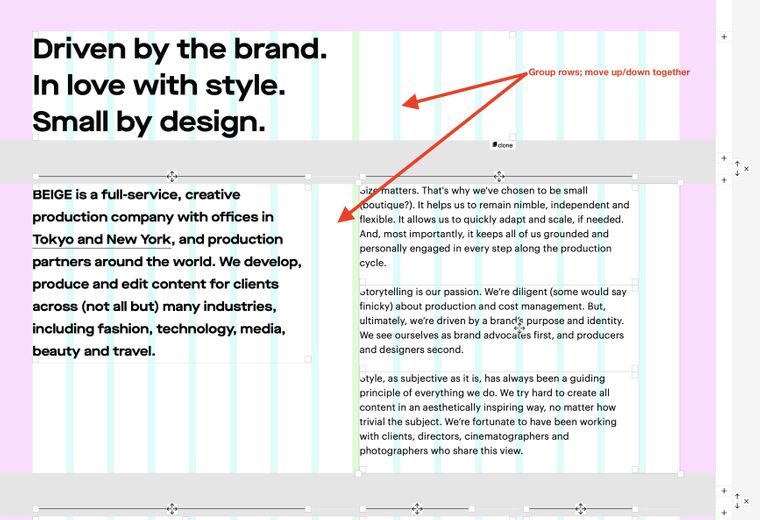
Currently (unless I'm missing something), I can only move up/down one row at a time. So if there are several rows I'd like to move to another place on a page, I need to move them individually, one after the other. This seems a bit cumbersome, especially if there are rows that contain text, images, horizontal lines, spaces, etc.
My question is if there is a way to somehow group several rows into one, say, block, and then move that block as one element, using the up/down arrows.
I guess one approach would be to use stacks for elements that belong together (instead of using a separate row for each element).
I've attached a screenshot (although I'm not sure if it actually helps explaining this further).
-
Lay Theme and Polylang_Front Page@rocked23 Ah, sorry about that. Try this one: https://drive.google.com/drive/folders/14kQ_7C6hEwktKLXzmAYcBwAzm8lSl_gi?usp=sharing
-
Group rowsIs there a way to group multiple rows, and move them up/down all at the same time?
Thanks!
Alex